
If you enjoy this post, please retweet it (Twitter/X), boost it (Mastodon), repost it (MeWe), or repost it (BlueSky).
In my last update, I hinted at something new now that the VTT is stable and good enough for production. Well, after quite a bit of work, that something new is at least to the point where I can provide screenshots. Bridge is a web-based app that manages Master Control Panels and Bridge Consoles for the FASA Star Trek RPG (think character sheets but for starships). It’s not even ready for an alpha release, but I’m certainly more than halfway to that. Eventually, it will fully integrate with my VTT, but both apps will remain independent in case you want to use one but not the other. I can appreciate wanting to sit around a real table with pen and paper but using a flat TV for the VTT battle map, but I can also appreciate wanting to use 3D models on a paper battle map while letting Bridge do all the bookkeeping for you.
Before I show you some screenshots, I want to make sure you know how the game is played in a very broad sense. In 2nd edition, starship combat can be played using the Basic game, Advanced game, Graduate game, and Command and Control (“C&C”). In an even broader sense, the game can be played as an RPG or as a board game. While it’s possible to use any game for either an RPG or a board game, the way it usually plays out is that players use (in ascending order of complexity) Basic, Advanced, or Graduate (“B/A/G”) for board games, and C&C for an RPG. In B/A/G, a player runs the entire ship (or multiple ships), so that player handles all ship duties (i.e., power allocation, shields, weapons, etc.). In C&C, the players play characters from the same ship’s crew, so each player takes on one or more roles within that crew. In other words, I might be the captain and run the engineering and science stations; you might man the helm and weapons console; and someone else might man navigation and communications/damage control. If you have enough players, everyone might have one role; otherwise, some are going to have to double up. Also of note, this game was designed for the original series TV show and movies. While there was some support for Next Generation, FASA lost the license before they could really make the rules work with the changes made by that show. My app won’t support TNG rules.
But hey. Enough talk. Here’s what it’s going to look like.
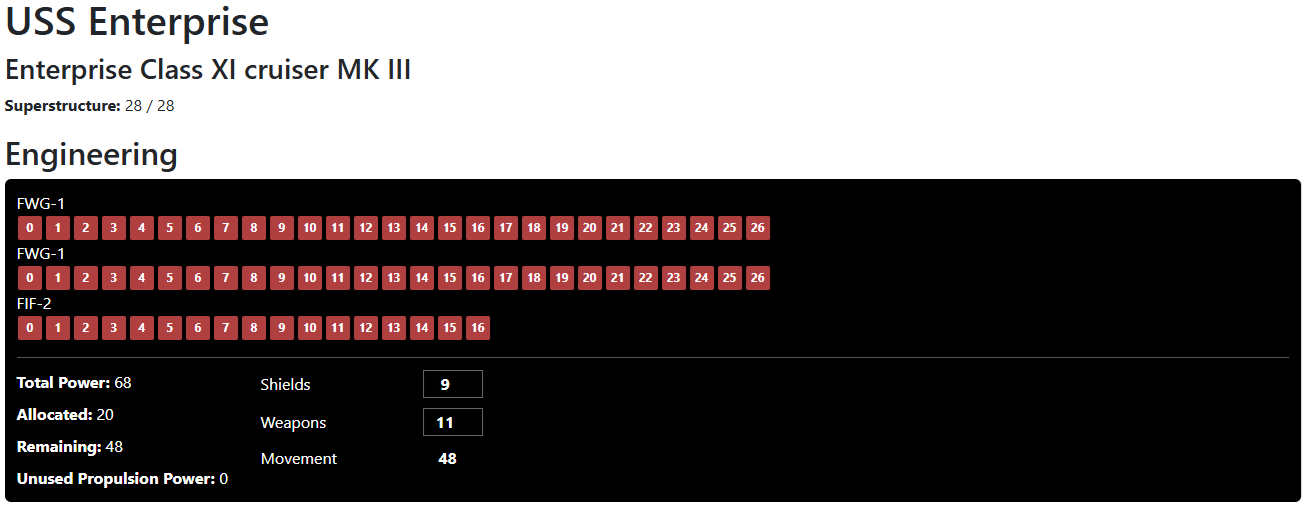
First up is the engineering console for the USS Enterprise (movie refit). If you know the game, you know what this is, but not everyone does, so here’s the basic gist. This tells you how much power your engines produce. As engines get damaged, some of those control panel lamps will go dark And your total power will decrease. In C&C, you assign power to shields, movement, and weapons according to the general request given by the Captain (e.g., “focus on shields!”). In B/A/G, because you control the entire ship, you won’t have to do this. You simply allocate power to individual systems, and when you run out of power, you may need to rethink those allocations. The point is that you can cut out the step of assigning power on the engineering screen. Note: I know the console is a little wide, I’m going to fix that, but not by much. I’m going to add a chat window to all these panels so that you can receive messages from other players or from the system itself.
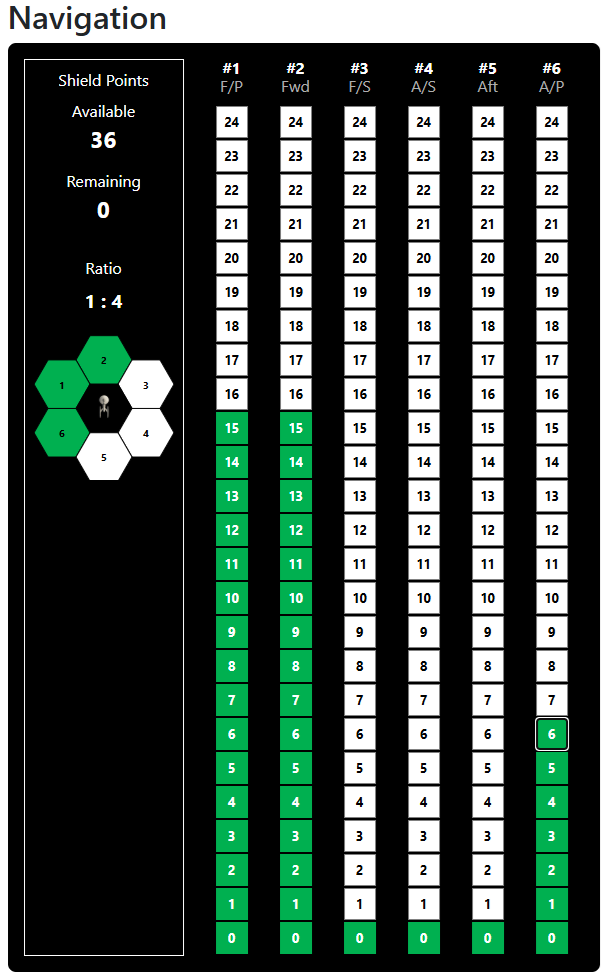
Next up is navigation. In this case, engineering assigned 9 power points to shields, but most shields operate on a favorable power ratio. In this case, those 9 power points resulted in 36 shield points, which I’ve distributed to three shields. If a shield absorbs incoming fire, the higher lamps will light yellow to reflect that. If a shield is damaged, all lamps light red. If a shield is destroyed, it goes black. For those who know the game, there’s an additional state. If a shield temporarily cannot use the power that was allocated to it because the engines (or engineering itself) took a hit, the navigator must choose which shields lose power, and the lamps at the top turn orange. If the engines are repaired during the current turn, those orange lamps will once again turn yellow or, more likely, green due to the repower phase.
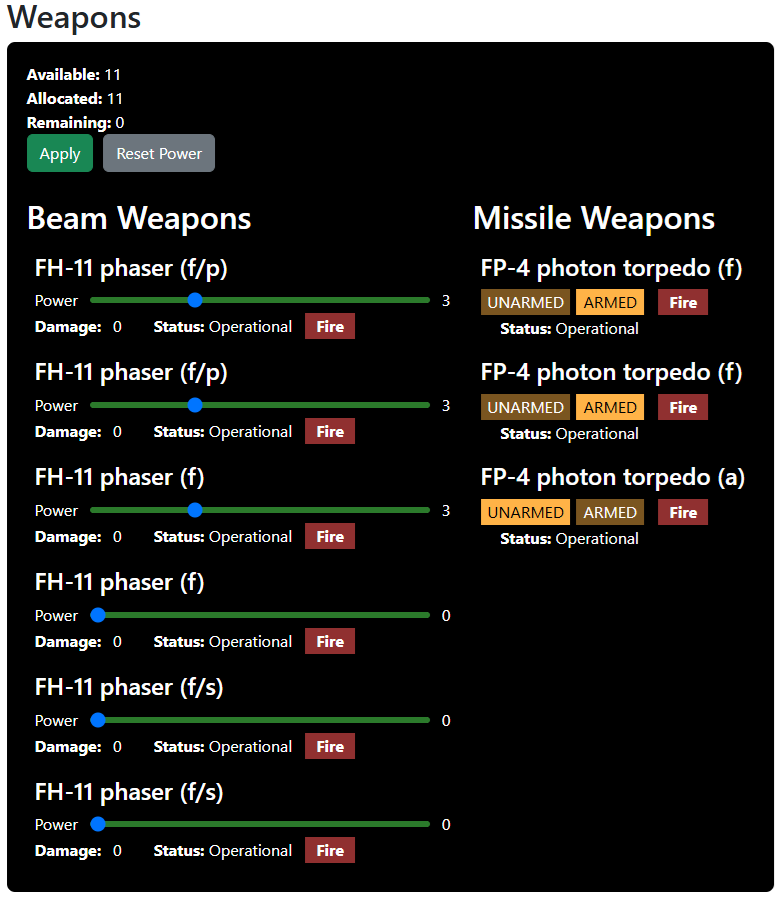
Next up, we have the weapons console. Note that this is not the helm. I’ve divided them for two reasons. The in-universe reason is that, in the movies, the weapons console was separate from helm. The in-game reason is that you want to be able to create as much of a sensible division among responsibilities as you can to accommodate the varying number of players that may be at the table. In any event, you can see that I’ve armed two photon torpedoes and energized two phasers.
But Rob! What about the Romulans?!?! Hey, I always favored the Romulans as the enemy. I’ve got it covered.
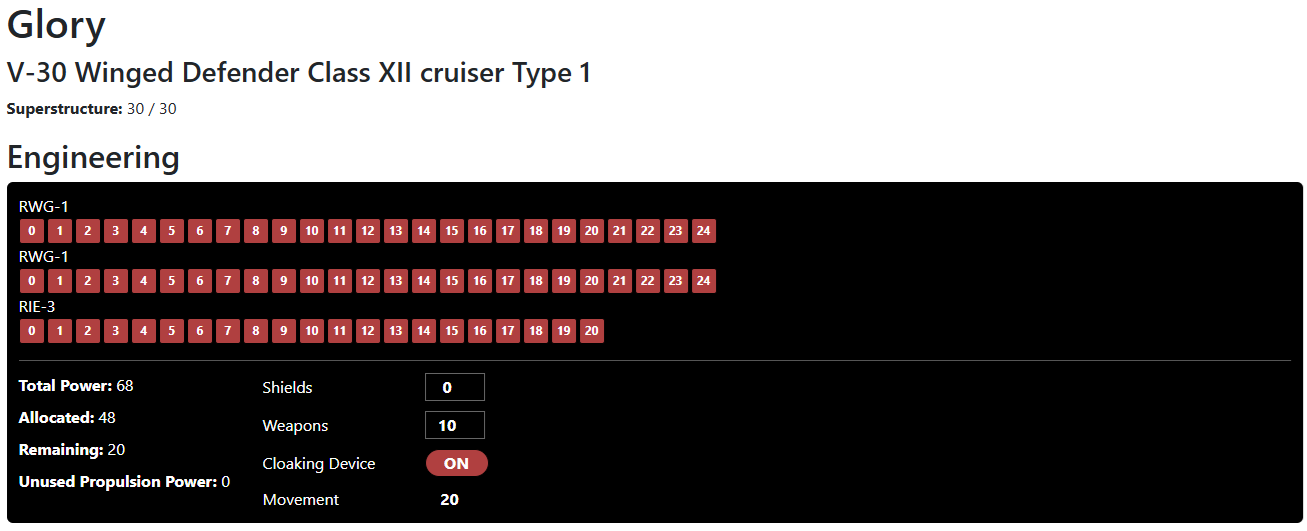
Here you can see that there’s a new button on Engineering to turn on the cloaking device.
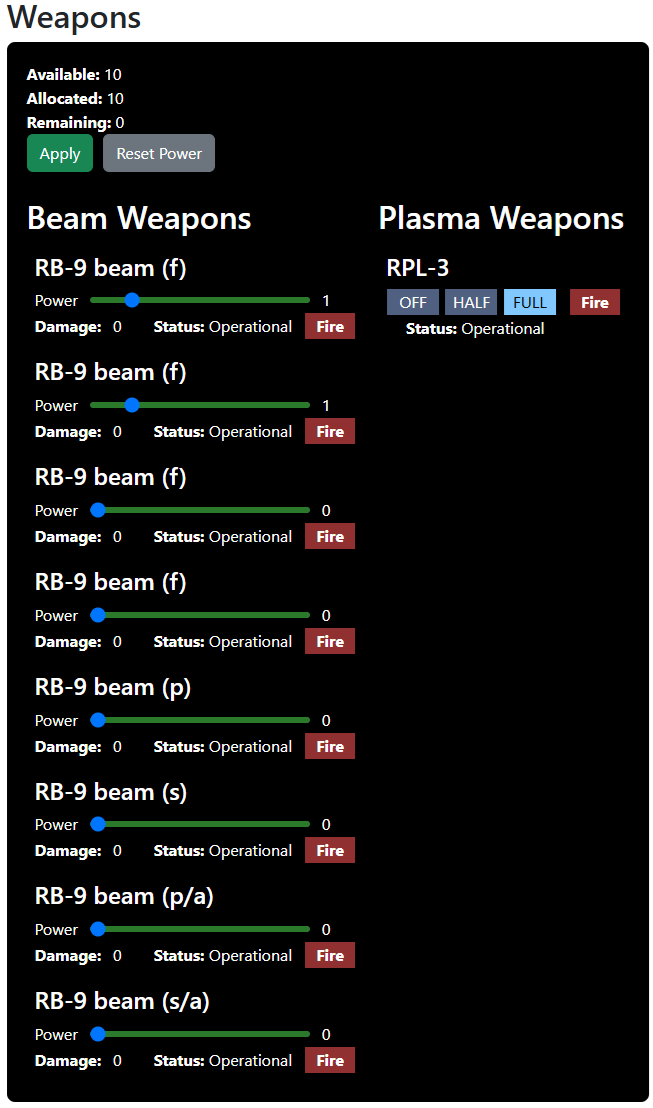
And here you can see that this Romulan ship has a plasma torpedo instead of those lame-ass photon torpedoes. That’ll knock your ship out of whack.
The next console on the list is the damage control panel, but first I have to do some boring architectural work with the turn/phase system. Then I have to tackle the helm and science station, and then my own invention: The captain’s console panel. More coming.
As always, happy gaming!
Follow me on Twitter/X @gsllc
Follow me on Mastadon chirp.enworld.org/@gsllc
Follow me on MeWe robertbodine.52
Follow me on Blue Sky @robbodine

