Let's roll some dice, watch some movies, or generally just geek out. New posts at 6:30 pm ET but only if I have something to say. Menu at the top. gsllc@chirp.enworld.org on Mastodon and @gsllc on Twitter.
The quarantine has me doing a bit of blogging lately, which means I’m also looking at my stats. With respect to my posts regarding copyright and RPGs:
The posts are broken into two separate issues. Part 1 and part 2 are about the copyrightability of RPG stat blocks, and part 3 (not relevant here) is about the OGL. As to the first issue, to date, part 1 represents ~30% of text by page count and has 17,037 hits (edit 10/20/2020: 17,667 hits), whereas part 2 (70%) has only 704 hits (edit 10/20/2020: 802 hits). Moreover, part 1 spends much of its text on going over basic copyright principles that don’t represent the actual argument. It’s clear by the stats and the basis of the criticism itself (often peppered with personal insults) that the vast majority of (non-lawyer) criticism I’ve received is from people that have read only 30% (at most) of that argument. I know it’s long, convoluted, and at times poorly written (mostly because it targets two very different audiences); and you’re under no obligation to read it (or even care about it). However, it’s all connected, and if you’re going to criticize it, you should probably understand it first.
Or not. Free speech and all that.
Endnotes:
1/27/2023: In the continuing mess of the OGL 2.0, I have since written focused posts on certain critical topics, expanding on them and, I hope, making them clearer.
Part 3 has only 703 hits (edit 10/20/2020: 849 hits), which is surprising. I thought it would be the most read post.
Part 3.5 provides necessary clarification and correction to Part 3.
Part 4 answers frequently ask questions and addresses frequently raised issues.
Over on a lawyers-only subreddit, the attorneys seemed to want to discuss only my side note on patentability of the Shadow of the Demon Lord initiative system. I guess it’s great that they all agree that my argument is trivially correct, but Rob Schwalb has seriously hijacked my glory. I let him have it when I saw him last February.
If you enjoy this post, please retweet it (Twitter/X), boost it (Mastodon), repost it (MeWe), or repost it (BlueSky).
I announced my FASA Star Trek RPG VTT some time ago, but all it represented was a digital battle map that can be used standalone. Now, the second component has made enough progress to release the beta version. I call the second component Bridge. It manages the master control panels, which are analogous to character sheets but for starships, using the second edition ruleset. While also able to be used standalone, using them together is where they really shine. Before explaining how to use Bridge with the VTT, let me first give you the very basics as to how to use the system, then point you to the VTT help file that provides more details.
Some of what I describe here won’t make sense until you read the section below entitled, “It’s Not All Good News.” I’ve tried to identify and label all such items “(q.v.).” Also of note, I often assume you know how to play the game (2nd edition rules).
Play with the default test ships if you want to get the hang of things, but when you’re ready . . . .
Click Join Room on the right-hand menu.
Enter a room number, your name (must be unique per room number), a password for your other players to use to enter, select Create New Room, and enter an admin password (must be different from the regular password) that allows you to retake control of the room if you’re dropped. Your players will ignore the checkbox and admin password
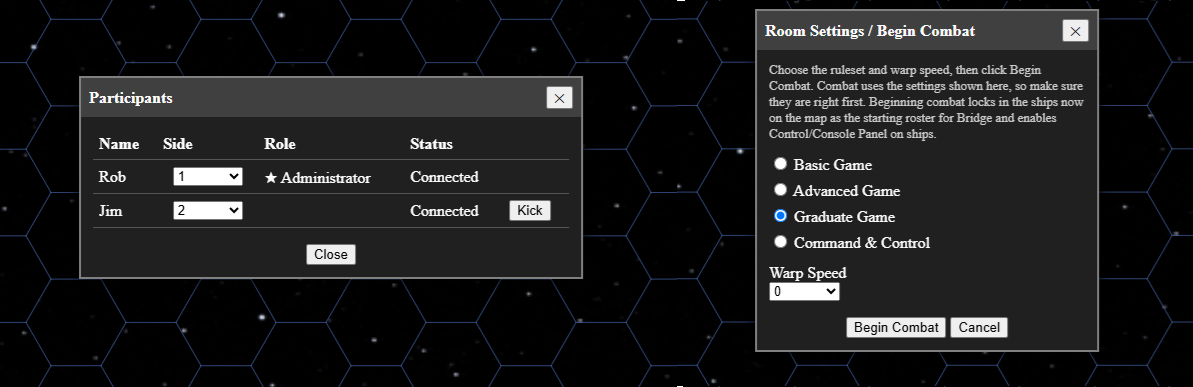
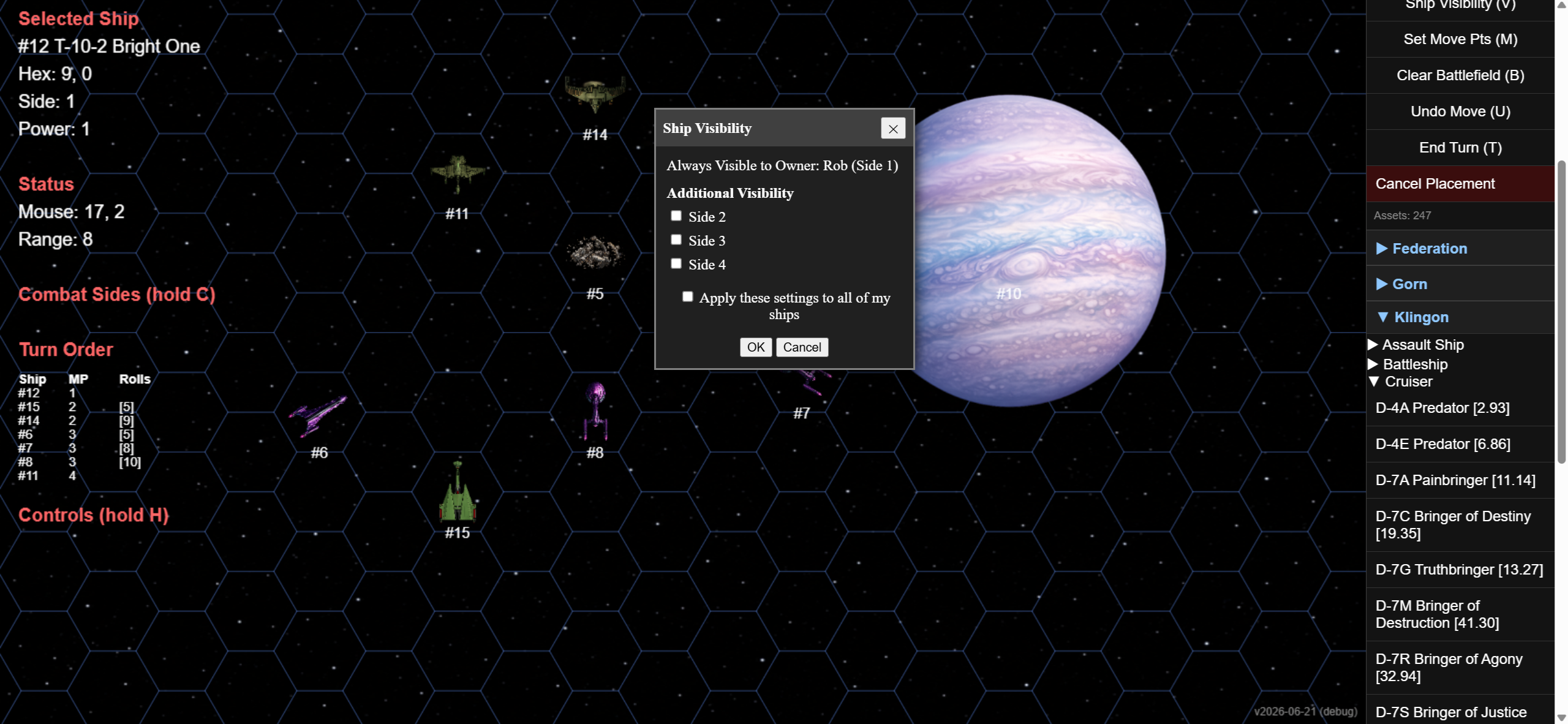
As admin, when you create the room, you’ll be given a participants dialog box (see image below) where you assign each player to a side. Even if two players are playing allied forces, it will be better if they’re treated as different sides. You should wait until everyone has joined before closing the dialog box, but you may always reopen it by clicking Participants on the right-hand menu.
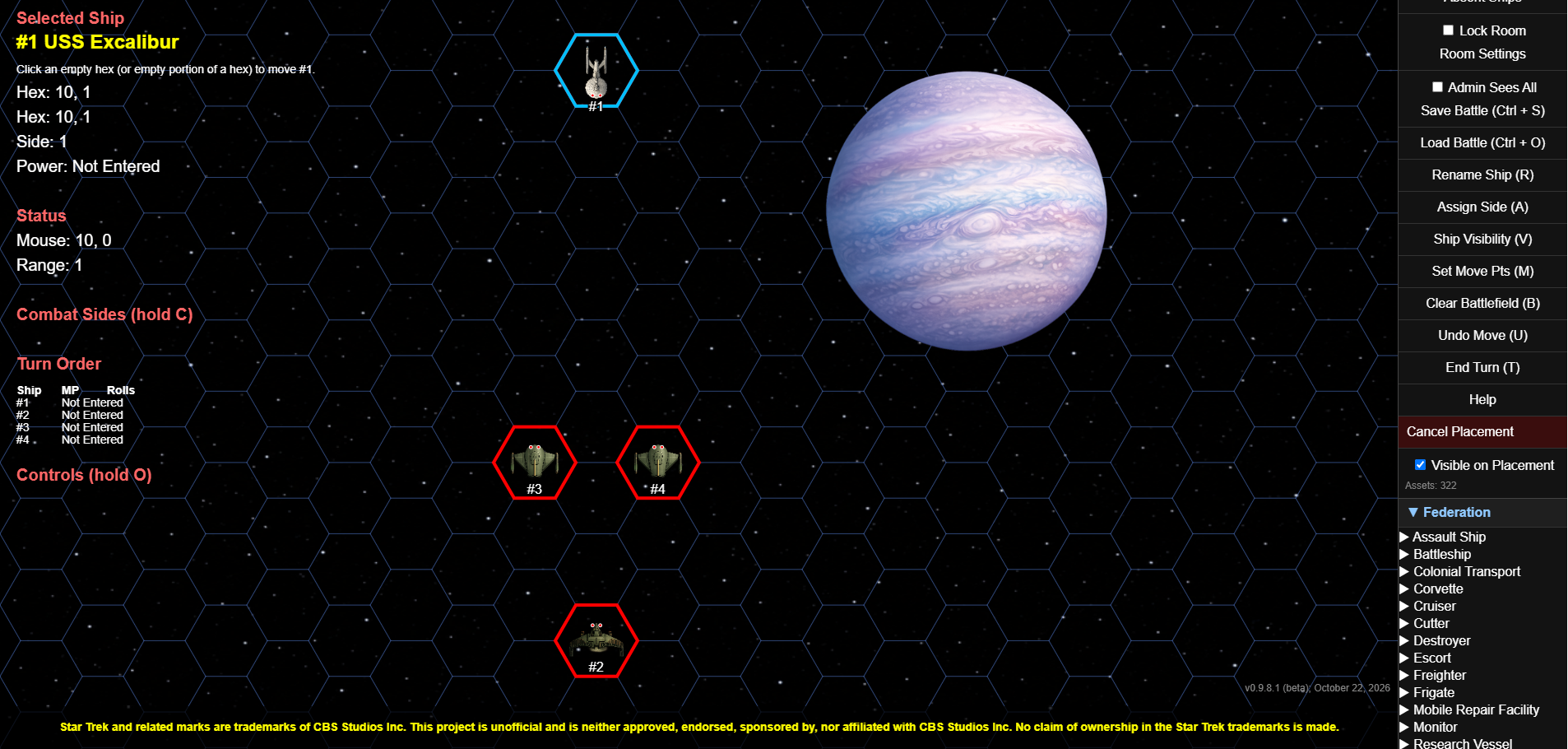
Once a player (including the admin) is assigned a side, that player can start placing ships on the battle map. If you want the ship to initially be invisible when placed, make sure Visible on Placement is unchecked. Uncloaked ships should be visible from the start (unless hidden behind a planet, etc.), so make sure that check box is checked if your ship isn’t going to be cloaked to start the encounter.
To add a ship, go to the bottom of the right-hand menu, find your government, expand the menu, find the ship type, expand that menu, then click on the relevant ship. This places you in Placement Mode. Click on a hex, and the ship’s silhouette will be placed. You may also add “obstacles,” which include stars, planets, moons, asteroids, wreckage, anomalies, black holes, and space dust, all of varying sizes. When you’ve placed all your assets, click the slowly flashing Cancel Placement button on the right-hand menu.
Right click on your ship to change its name, side, controlling player, visibility, movement points (unnecessary with Bridge), or delete the ship altogether. (Clicking Clear Battlefield on the right-hand menu clears all ships, but only the admin can do that.
If the admin isn’t playing as a GM, the admin should uncheck Admin Sees All on the right-hand menu so that cloaked ships and ships behind obstacles are invisible to the admin.
You can use the Participants dialog box to boot an unruly player, then check the Lock Room checkbox on the right-hand menu to require admin approval before letting someone back in the room even if they know the password. If they keep spamming you with requests to enter, you can click ignore to ignore their future requests.
Finally, click Room Settings on the right-side menu to open the Room Settings dialog box (see image below) assign a ruleset (avoid C&C for now) and warp speed at which the encounter takes place.
If you’re ever stuck wondering how to do something, hold down the O key, and you’ll see a partial list of controls appear on the left side of the screen. These include controls for manipulating the battle map itself (e.g., zoom in, zoom out, panning). The left side display includes a lot of useful information, so make sure to take a look at it.
Bridge
This application doesn’t have a help file, so it’s going to take a bit more to help you along with it. Still, I think a lot of it is intuitive, so you may just want to learn through doing rather than reading about it. In case not, here’s some help with some visual aids.
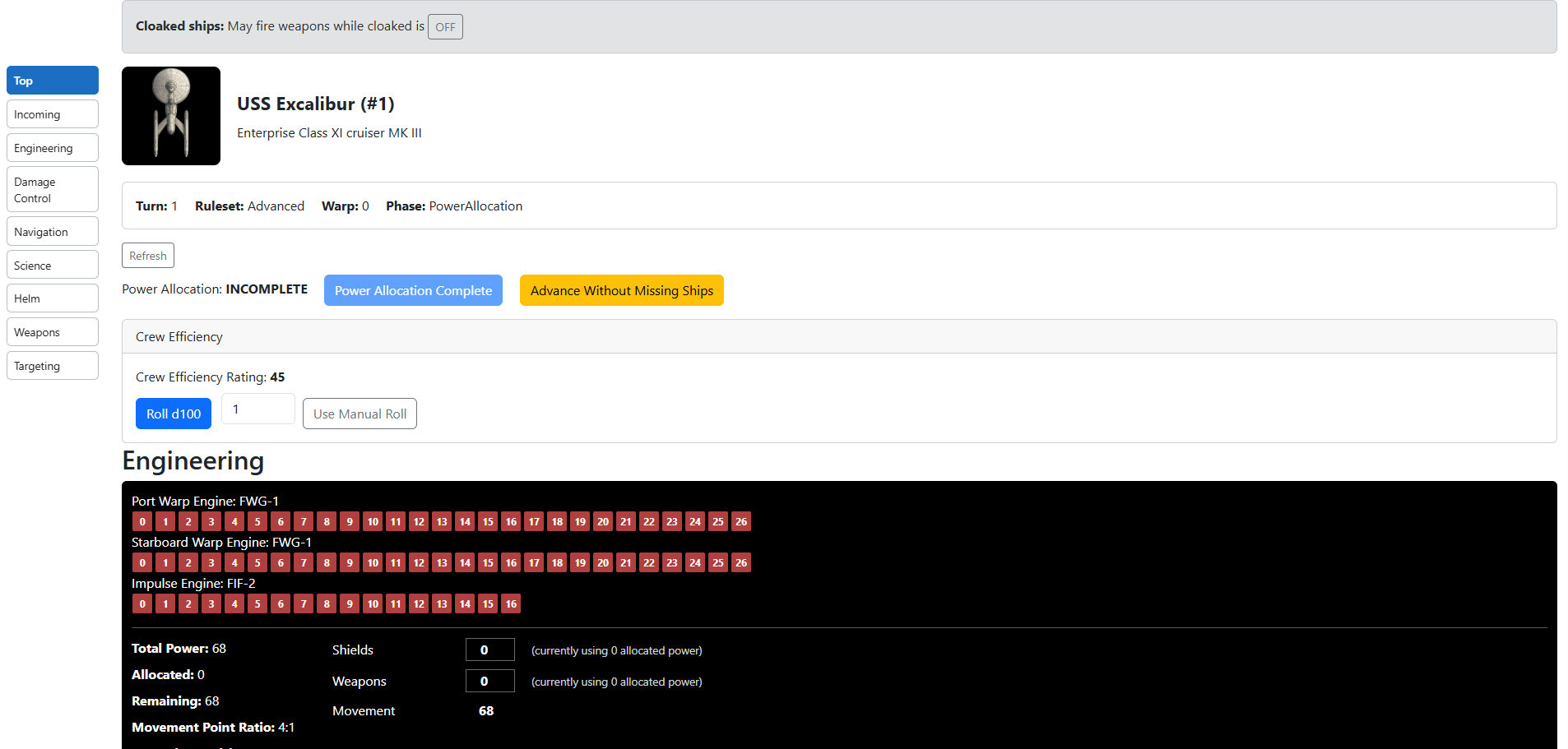
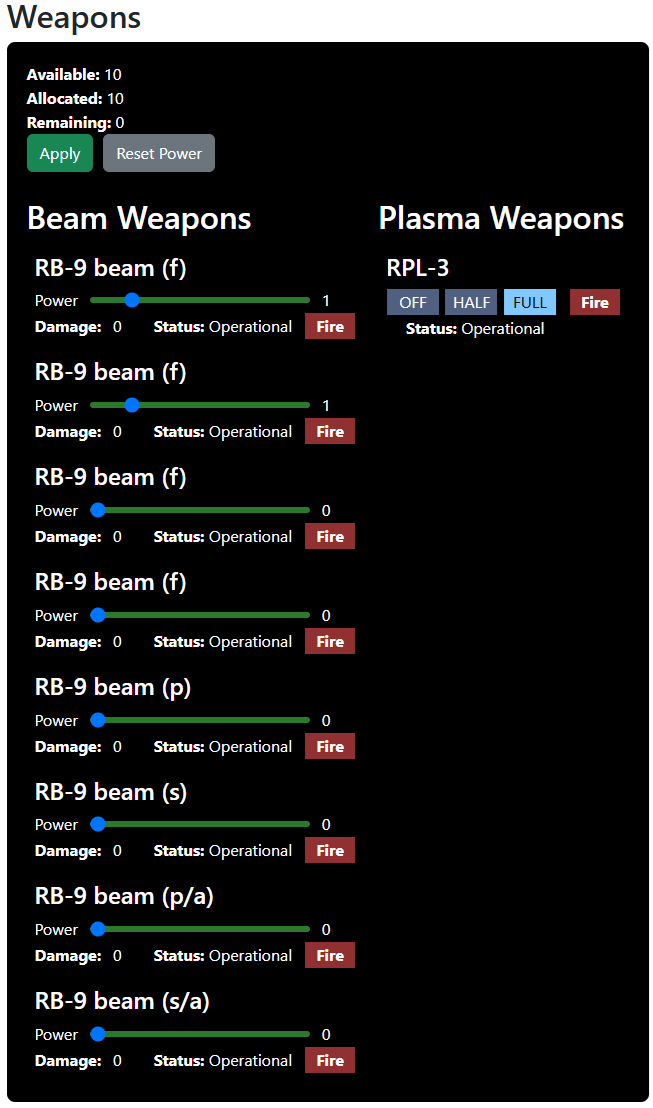
First up is the top of the screen and your engineering panel.
Engineering console and some stuff for the Captain’s Console when it’s ready.
The top identifies your ship, the turn number, rule set, encounter speed, and phase. It also provides for skill rolls (crew efficiency in Advanced and Graduate; Skill Rolls in C&C) and later will provide for other decisions (q.v.) generally reserved for the Captain. Once we have a Captain’s Console (q.v.), these will be far better organized. As you can see, you may roll automatically or roll with dice and enter your roll manually. The admin/GM will eventually be able to forbid manual rolls, but for now, they’re allowed. If you don’t want to use them, you don’t have to. Just agree not to use them until the switch is enabled.
You’ll also notice the yellow button. Sometimes there are six ships on the battle map, but only four are currently fighting (e.g., the other two represent a second wave of ships that enter in turn 3). In that case, the game gets held up because not all ships have allocated power yet. The Advanced Without Missing Ships button appears on all of the admin’s ships and allows the admin to advance the game without the missing ships. The missing ships won’t be able to join combat until the first phase of the following turn. If they attempt to enter early, they’re placed in a waiting room with a disabled Join button that becomes enabled as soon as they’re able to join.
Below these is the Engineering console. There, you enter the amount of power allocated to shields and weapons (and cloaking device if you have one), with the remaining available power automatically being allocated to movement. To the left, it warns you if you’re wasting power because of the movement point ratio. That is, if your movement point ratio is 4/1, but the amount of power to movement is not evenly divisible by four, then you’re wasting some power points. Also, using the menu on the left side of the screen, you may jump to the Weapons console and arm weapons before allocating power to weapons, then jump back to the Engineering console where you’ll be told how much power you allocated to weapons. That makes it easy to enter the correct allocation. With shields, you must allocate power before you can assign shield points, so jump to Navigation, look at your shield point ratio, and allocate accordingly.
If you lower your allocation to shields after assigning shield points or fail to allocate weapons, or fail to execute your skill rolls, the Complete Power Allocation button will be disabled. Once those three tasks are performed, the button will be enabled, and you should click it. Then you’ll be jumped automatically to the Science console for the Sensors phase (or to the Helm in the Basic ruleset).
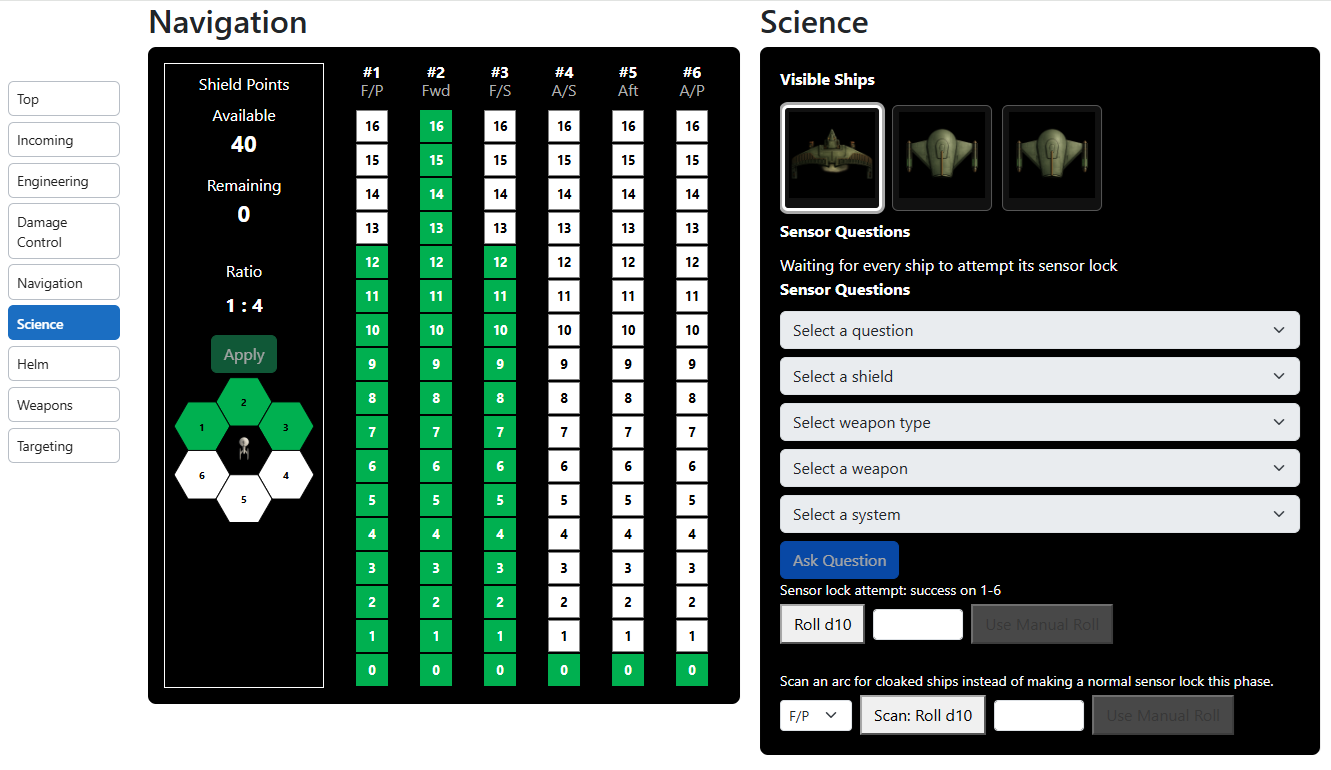
Next up are the Navigation and Science consoles.
Navigation and Science Consoles
Navigation: You’ll be told how many shield points you have available to allocate. Allocate (or deallocate) them by clicking the appropriate lamp. (I call these lamps because they’re meant to emulate the lights on the original series consoles.) A few notes. If a shield generator is damaged, the lamps will all be red. If destroyed, they’ll become very dark grey (essentially black). If the shield is hit and temporarily expended, the amount by which it’s been expended will turn yellow. Finally, if power has been temporarily reduced due to engine damage, the lamps will turn orange (with green lettering) to the extent they’re reduced in power. If the engines are repaired during the current turn, the lamps will light green again.
Science: Outside of Basic, you have two choices for sensors. First, you may select a visible ship and attempt to lock onto it. If you succeed, the first dropdown list (“Select a question”) will be enabled, and depending on which question you select, another dropdown list may be enabled for follow up. Second, you may instead search for cloaked ships. You must select an arc to search, and then roll to see if you detect anything.
Now, on to the Helm.
Helm Console
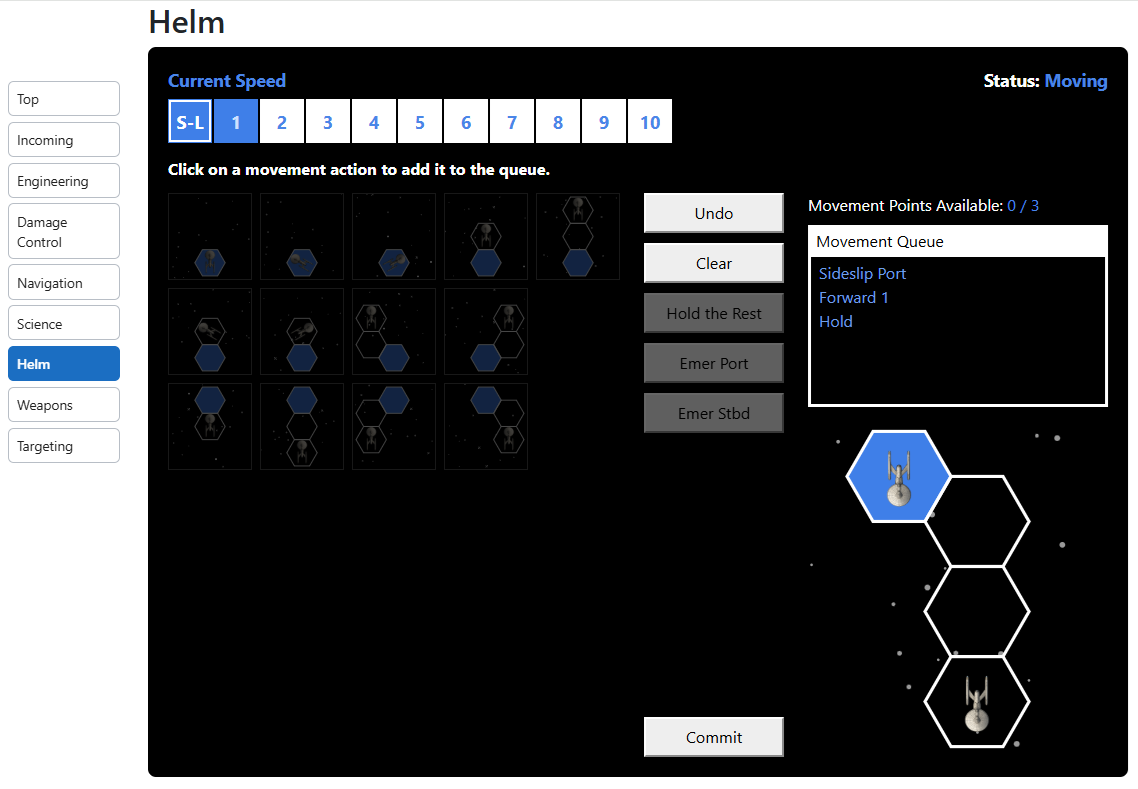
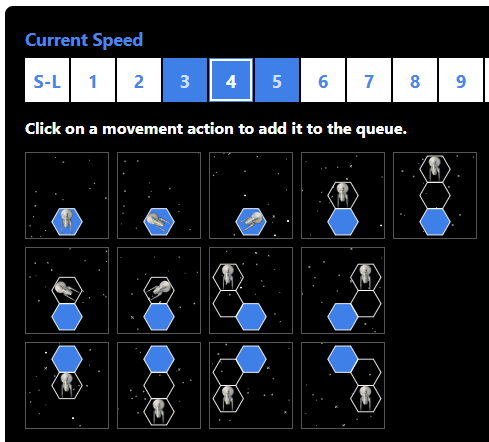
At the top left, you see the current speed of the encounter highlighted and outlined. You also can see the speeds you can change to without a skill roll (highlighted but not outlined). To the top right, you can see that it’s your turn to move. Other ships will have the message, “Waiting on ship #1 to complete movement.” In fact, similar messages will appear throughout the control panel so that if someone doesn’t realize it’s their turn, you may (politely, I hope) let them know that everyone is waiting on them. To the left, you can see diagrams showing the various legal movements available, each costing a movement point to execute. These will be lit up and selectable. Selecting one moves that action into the queue on the right, then adjusts the hex diagram to show how the ship will be repositioned on the map once you’ve made your final decision. None are currently lit up because all movement points have been used to queue actions. Also, this helm was printed in Basic, so the third row (reverse movement options) aren’t present. If you moved forward in this or the last movement phase, then the reverse movements will be unavailable and thus dimmed out. As for the buttons, clicking undo removes the last entry in the queue, clicking clear removes all entries in the queue (essentially starting over), clicking Hold the Rest fills the rest of the queue with holding station (if you have more movement points than you need for the phase), and Emer Port and Emer Stbd are enabled if making an emergency heading change is available at the moment (along with a warning in red text as to the damage your ship will take from the stress of such a heading change). Once you’re satisfied with how your ship will be moved, you should click Commit, your ship’s bearing and position will be updated on the VTT, and the next player in tactical order will then have their Helm enabled after reviewing how you moved.
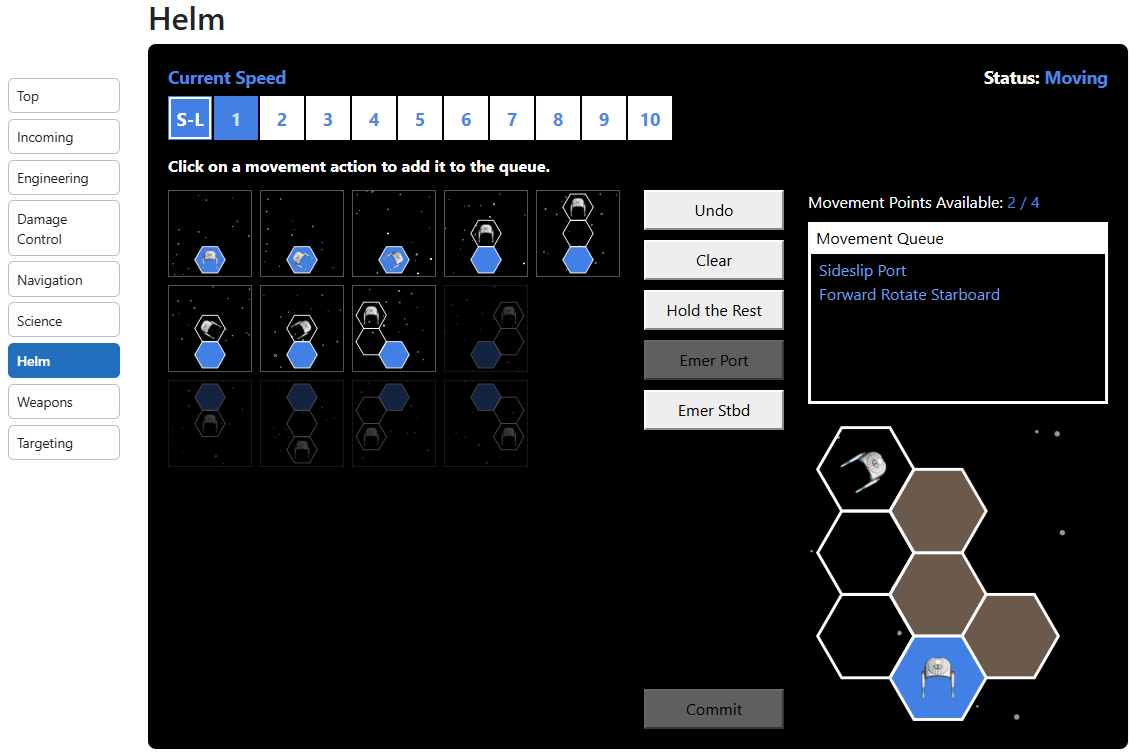
Here’s an image from the Graduate ruleset showing some of the missing features.
You can see some of the hexes filled in. That’s because the ship is navigating around a planet. You can also see reverse movement dimmed because of the forward movement, and one forward movement dimmed because it would cause a collision with the planet. The others are still lit and can be clicked to add to the queue that’s not full. Because one of the movements involved starboard rotation, the ship now has the ability to rotate an additional hex side as an emergency heading change; hence, the enabled button.
I intend to allow the admin to employ a house rule requiring all movement to be performed at the same time, but the rules don’t read that way, so it hasn’t been implemented yet. Note that such a house rule practically eliminates tactical advantage from the game, so I can’t make it the default rule.
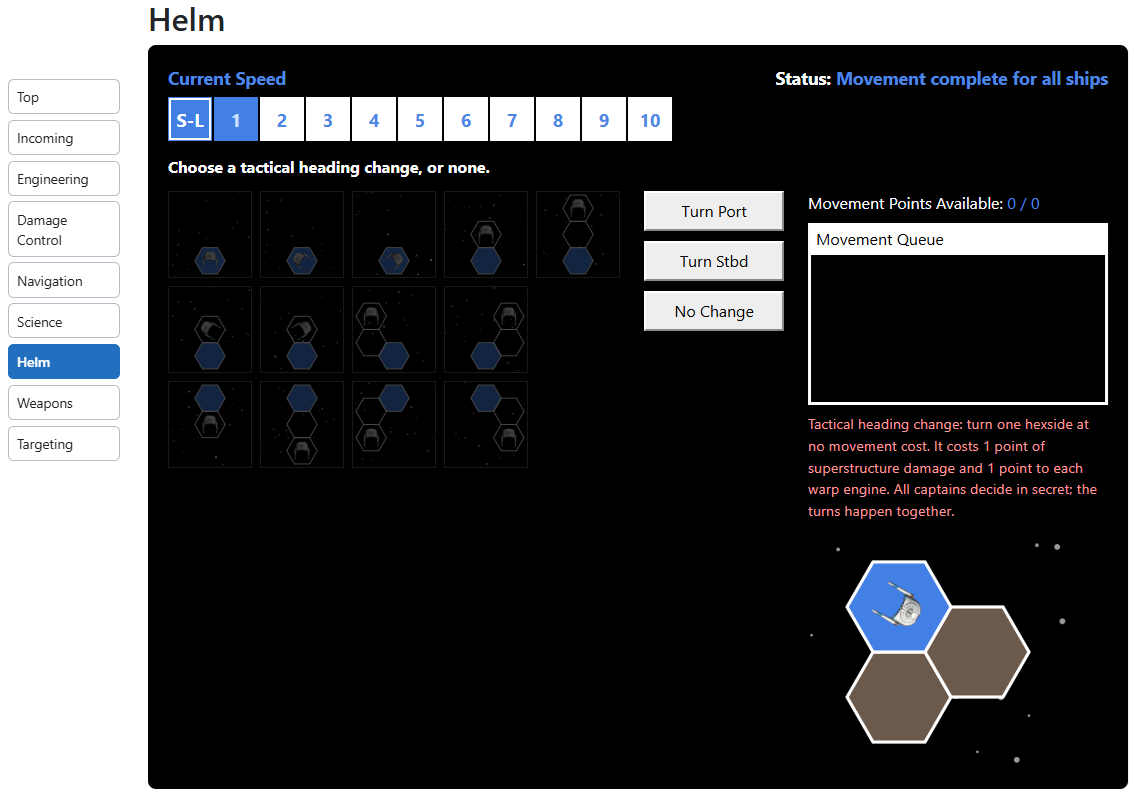
After this movement, you’ll then have three more buttons appear, replacing those five.
Everyone will be given the option of a tactical heading change to port or starboard, or in the alternative No Change (with the appropriate warning text for damage). In other words, the movement phase is divided into two segments: normal movement (performed in tactical advantage order) and then tactical heading (performed simultaneously).
Warping out (not shown here) is implemented from the Helm but during different phases depending on the ruleset. The skill roll allowing a ship to warp out by a change in two warp factors is handled during the C&C skill roll phase, and if the engineer’s roll succeeds, additional warp speed lamps are lit.
This is the last Helm image you’re going to get.
Now that you’ve moved, it’s on to weapons.
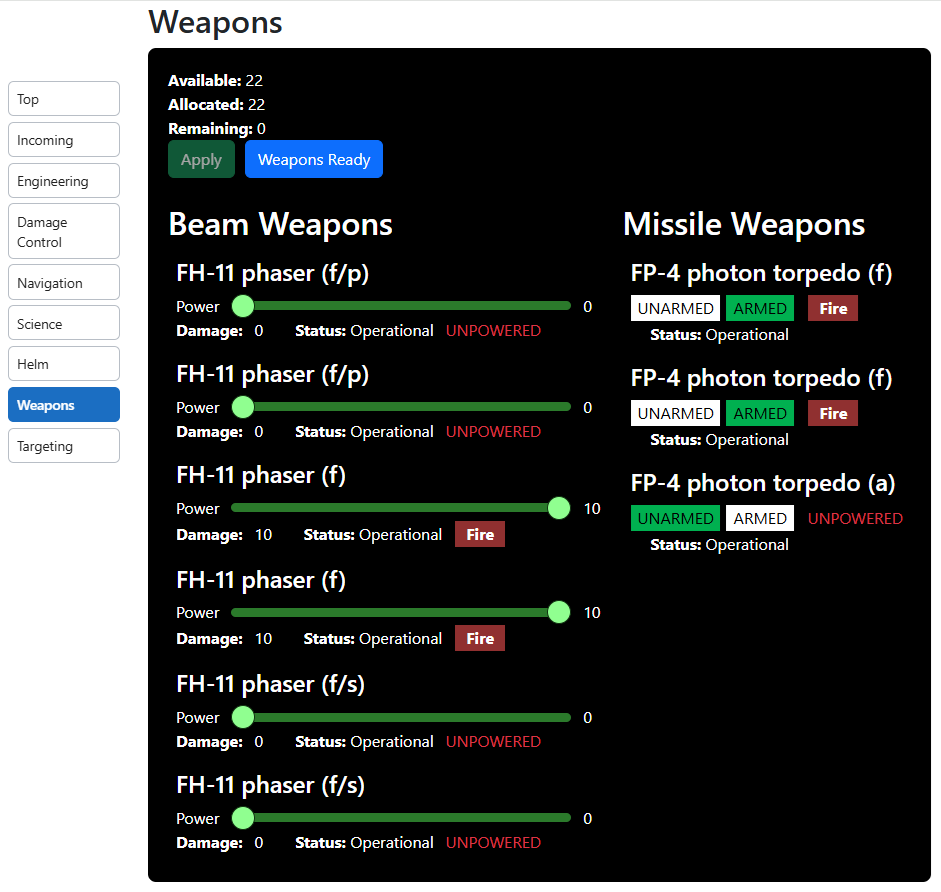
Weapons Console
Like the Helm, the Weapons phase is divided into multiple segments, but more than just two. In the first segment, everyone simultaneously chooses which weapons to fire. If a weapon has no valid targets, you won’t be able to fire it no matter how many times you press the button. You’ll get a message telling you so. Once you’re done with your selections, if you aren’t firing all weapons, you’ll need to hit the Weapons Ready button to proceed. Everyone will receive a message that they’re waiting for others to compete their firing selections. Note: There’s now a Fire All button that fires all weapons that have valid targets that aren’t allies. If you click that, those weapons fire, and you won’t have to click Weapons Ready. This brings you to the targeting segment (which will eventually be merged into the weapons console rather than appear below it).
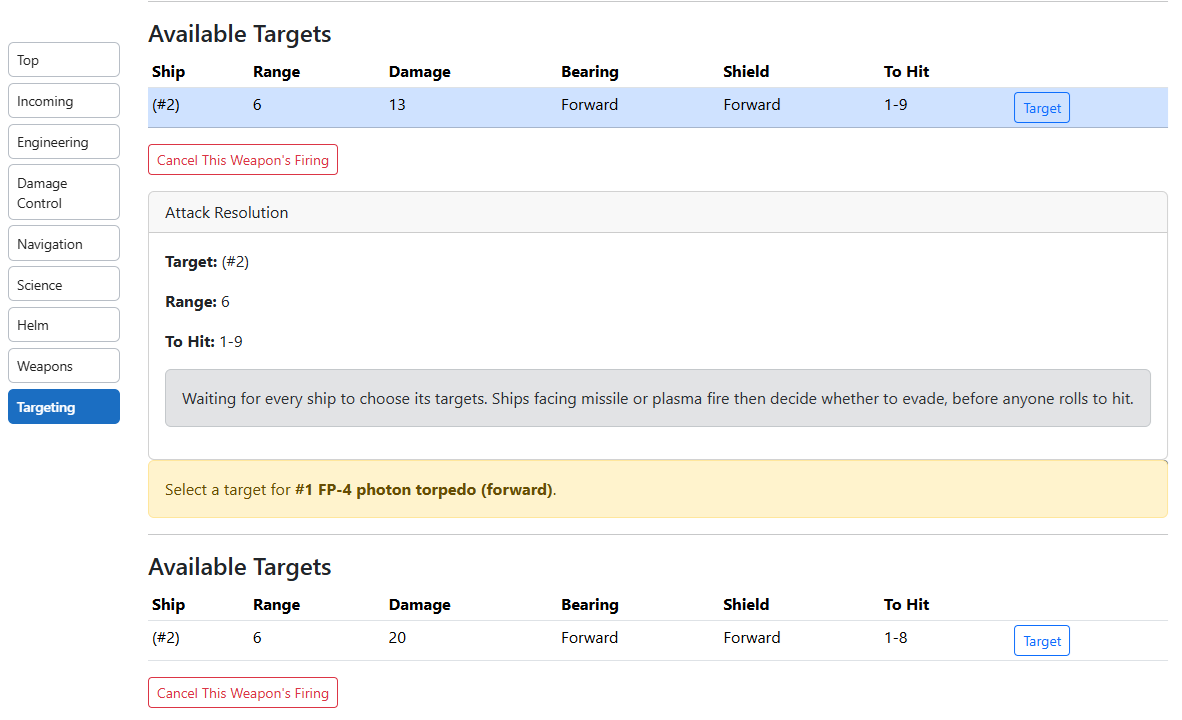
Targeting
Here, you can see that the bottom weapon hasn’t yet chosen its target. In this case, there’s only one valid target, but there will be a list of multiple valid targets where such targets exist. The top weapon has already chosen its target and therefore displays a message that it’s waiting for other ships to choose theirs. Once everyone has chosen their targets, we move on to the attack and damage resolution segment.
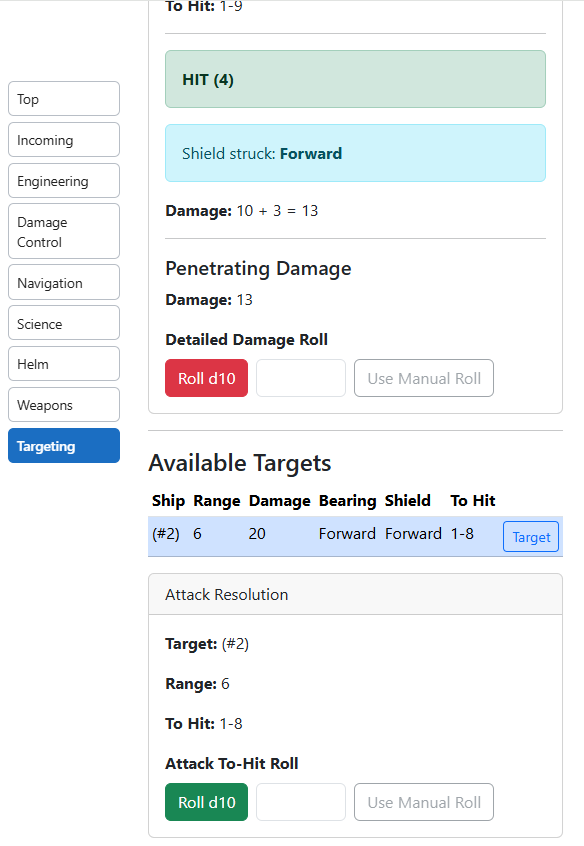
Hitting and Resolving Damage
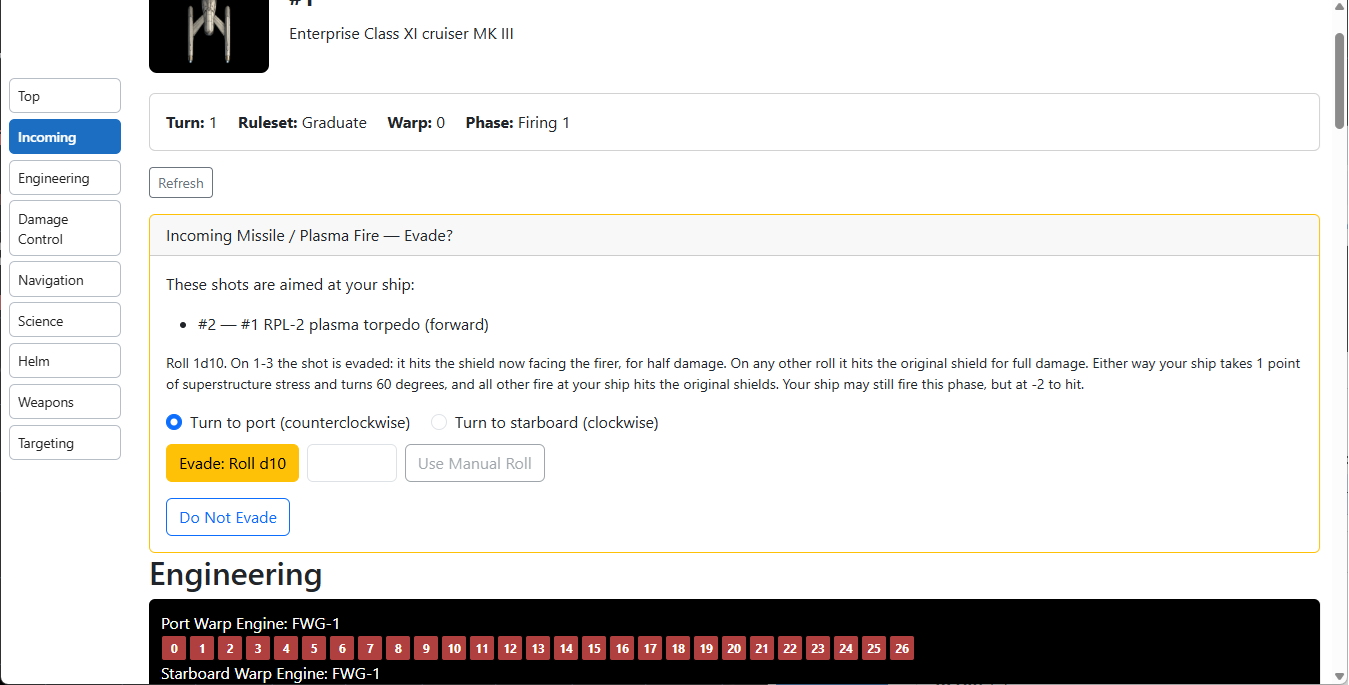
The top weapon has already rolled its (successful) to-hit die. It therefore received a message as to how much penetrating damage was done, so now the player is being asked how to resolve such damage. So, what if the weapon is a missile weapon (i.e., photon torpedo, energy torpedo, or Romulan plasma torpedo)? Then the target ship’s console is jumped to Incoming.
The target ship gets a chance to evade either to port or starboard. But this is a Romulan plasma torpedo, so in addition to evasion, there’s an additional option.
Here, the captain may attempt a skillful maneuver. Again, all of these options will be better organized on the Captain’s console (q.v.) once it exists.
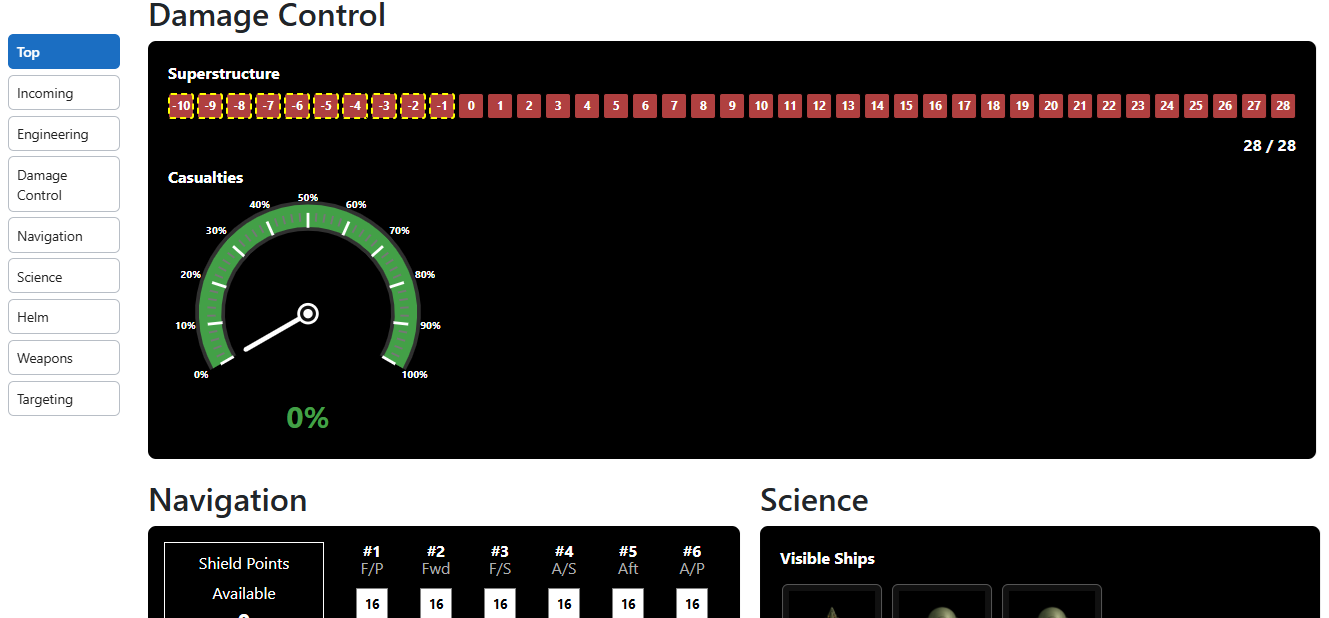
Okay, I skipped one: the Damage Control console. In Basic and Advanced, it’s boring. It’s just shows superstructure. So, here it is in Graduate.
Damage Control Console
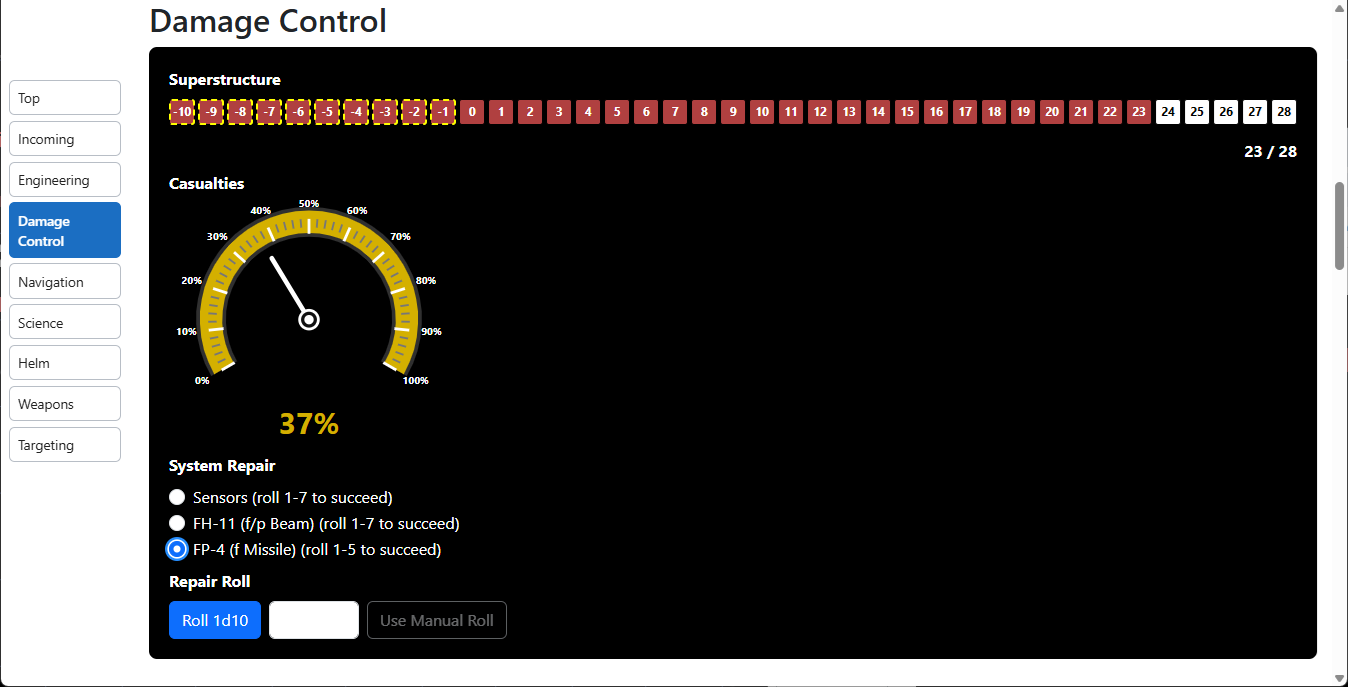
Maybe that’s still boring, but as a ship gets damaged, the Damage Control console will provide options for repairs.
Like so.
The Use Manual Roll button will be much clearer if you enter a roll in the text box. Basic doesn’t allow repairs, Advanced doesn’t allow repairs of weapons, and C&C allows repairs but without a separate Repair/Repower phase. So, there are a few different ways repairs are dealt with on this console. If you understand it in one ruleset, you’ll have no problem adjusting to the others.
How Does It Play?
This is a question for you to answer. My goal was to create a digital tool that still felt like you were playing the tabletop RPG. I know there’s one on Stream, but I’ve never been able to play it. I can’t even tell you why. Was I supposed to pay a fee? Is it available only when announced? Do you have to receive more than a public announcement to be invited? I have reason to believe any one of those could be true, but I really have no idea which, if any, are. It never seems to be available to me when I’ve tried. I also had a desktop version from back in the early 2010s, and I appreciated it, but it played like a video game. You weren’t really managing the mechanics of the game yourself. If you want to play this, just navigate to the site and start playing against anyone else that wants to play. You don’t have to send me any money, and you don’t wait for me to tell you it’s okay. You just have to find a frenemy to destroy. Ideally, this will bring you back to the 80s and feel like you’re playing the TTRPG. Just please let me know if you find any bugs or even things that don’t represent good game play. But before you do . . . .
Preferably without the big hair.
It’s Not All Good News
There are some important limitations.
Basic, Advanced, and Graduate are largely good to go. Quirks aside, you can use the apps to run skirmishes in those rulesets right now. While you can run a game in the Command & Control ruleset, you still must run the entire ship from a single window. In other words, the entire point of C&C — several players being assigned only some of the bridge officer positions for a single ship — isn’t implemented. Moreover, Engineering Hit isn’t quite ready for C&C, which means neither systems nor bridge personnel are shaken. So, if you run a game in C&C, you should expect to do so only as a curiosity to see how far along it is and to experience things like the Skill Rolls phase.
As the game plays out, your web page will reload far more often than it should. You may be getting ready to arm weapons, then suddenly your page reloads and jumps back down to the weapons console because of something I did with my ship. It’s annoying as hell, but you’ll probably get used to it. You won’t have to live with it forever though. Seriously, be prepared to be annoyed.
Sometimes the system can get stuck in one way or another. Clicking the Refresh button at the top of the page, or just reloading and “resubmitting” the page should fix the problem.
Some of the sensor questions are missing, although most of them are questions I added that aren’t in the official rules.
Speaking of house rules, my intent is to design the game exactly as the rules state, then provide the GM a series of optional rules to implement. Those house rule sensor questions will no longer be there by default once those “switches” are implemented.
One of the switches will be to disable the manual rolling of dice. As of right now, every roll made can be done automatically by the system upon clicking a roll button or by manually entering the result of a physical die roll and clicking a Use Manual Roll button. I can imagine GMs wanting to ban manual rolls to reduce cheating, but for now, they can’t, so don’t cheat.
I’m going to add a Captain’s Console in all rulesets that gives a player playing the Captain direct involvement in the digital aspect of the game. It will also better organize the information near the top of the page.
Orion and Romulan ships can’t yet self-destruct. A GM will be able to allow any ship to self-destruct, but I currently plan for the default to allow Orions and Romulans to do so. The rules say Romulans only, but Journey to Babel suggests that Orions are willing to engage in suicide missions, so I’m allowing it by default. For now, if you don’t like that, simply agree among yourselves that Orion ships won’t self-destruct. No one’s ever forced to self-destruct.
In keeping with what’s happened on the original TV show, I’m going to add a switch allowing a bridge officer in C&C to abandon his post and take over another, more critical post for a shaken officer. That’s not technically within the official rules, though, so you really won’t miss it yet. This, of course, means that the replacement officer’s original post will go unmanned, preventing, for example, gathering more information through sensors. The lock won’t be broken, but the questions won’t be askable while the Science Officer is firing weapons. Additionally, the players get one free bite at the apple. The Captain can take over a station as needed, and the only consequence will be that the Captain can’t add a 1d10 to his or her Starship Combat Strategy/Tactics skill rating when determining tactical advantage. Again, this will all be optional, but it’s consistent with how the show was written, so it honestly should have been contemplated by the rules.
This one isn’t my fault. The Combat Efficiency (“CE”) system kind of sucks. I’m doing research and trying to piece together different alternatives for determining combat strength. Right now, the left side menu can display the CEs for all sides of the combat. I’ll add alternative measures of ship strengths when I compile them.
My current list of tasks is probably about 30 tasks long, so maybe any complaints you have that are not already listed here are in the queue anyway. I’ll eventually edit this post and show my pending task list so that you know what’s coming. Still, your comments are welcome. It can’t hurt to ask for things not knowing whether I’ve already thought of them.
Sample Scenarios: The White Flame Campaign
In the VTT, you can create, save, and load scenarios so that you can prepare for your game session ahead of time. These aren’t saved online; you save them to your hard drive as *.json files. If someone else wants to use your scenario, you can email them the rather small file(s). Speaking of which, I’ve created the scenarios for the White Flame supplement. Due to limitations in my WordPress account, I can’t upload them here and create links to them, and I’m not giving out links to my Dropbox account. Instead, I created separate pages that contain the contents of those *.json files. Simply copy the text for one file, then save it. The page title is the name I use for the file, but it doesn’t matter what you call them.
Note that loading a scenario currently wipes out the existing one, which means you can’t currently load a “second wave” (or subsequent wave) to a combat. That means that you’d have to take the time to load the subsequent waves in the middle of your session, or, as I’ve done, include them in the original session and ignore them until they need to be used. Also, some of these scenarios require that some ships start the scenario partially damaged, and freighters are carrying shipments that, if the freighter explodes, it does extra damage. Neither of those are implemented yet.
If you enjoy this post, please retweet it (Twitter/X), boost it (Mastodon), repost it (MeWe), or repost it (BlueSky).
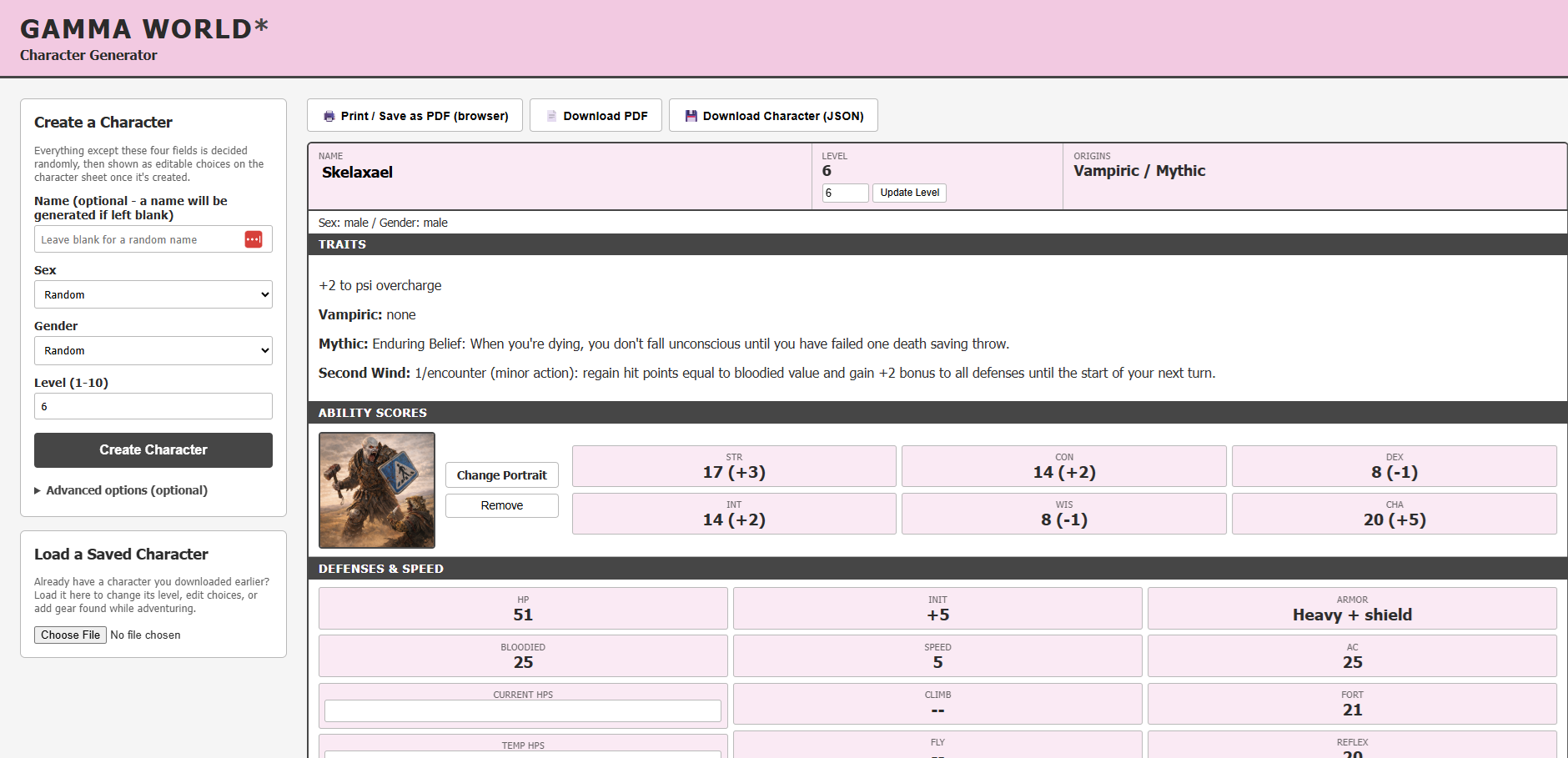
As you may remember, I published a character builder for Gamma World 7e using Microsoft Access. I also created a nightmarishly long AI prompt that could create a character in that system. These were not very popular. For all practical purposes, MS Access requires you’re running a Windows machine, and the workaround probably isn’t worth the effort. As for the AI prompt, well, AI isn’t very popular with gamers. So, I created a web-based character builder, which is available at https://builders.gamerssyndicate.net/. This should be more accessible to gamers not using the same technical suite as I.
Let me know what you think. If you encounter any bugs, download the character as a JSON file and send it to me. Tell me what you expected to see and how the actual behavior deviated from that. There’s a button to do that. The character builder is free to use and doesn’t require a login. Eventually, a login will be required because I’m going to add more character builders, some of which will be behind a paywall.
This one will always be free.
EDITS FOR 11/9.2026:
You may now restrict origins by source. The Gamma World Rulebook is always selected, but Legion of Gold and Famine in Far-Go may be deselected. Also, if you don’t use Legion of Gold, your character will be created without the ability to choose a vocation(s) and the feats associated with it(them). However, with the exception of Moon Gear, all gear from all sources is available no matter what’s selected. I don’t see why a GM should have a problem with me getting a pair of fur-lined slippers simply because he or she doesn’t own Famine in Far-Go. 😄 It’s not worth the rewrite to prevent it.
Once you create a character with a given subset of sources, those sources will be saved with the JSON file so that when you reopen it, you’ll be restricted from using the unselected sources. For characters already created before these changes, they’ll continue to be treated as if all sources were selected.
I accepted what appears to be the consensus and made Engineered Human the primary origin when selected. This has two consequences: +2 to overcharge all and your 18 will be in Intelligence, and your 16 will be in whatever your secondary ability score is (assuming it’s different). As always, you may have a 20 in Intelligence if they’re both Int-based origins. This accounts for an obvious error in the rulebook. You’re entitled to an overcharge bonus based only on your primary origin, but if Engineered Human is always a secondary origin, the overcharge bonus assigned to it becomes meaningless. See pages 34 and 56 of the Gamma World Rulebook
If you enjoy this post, please retweet it (Twitter/X), boost it (Mastodon), repost it (MeWe), or repost it (BlueSky).
Today, I had my annual car inspection required by the Commonwealth of Virginia. Also required: You must call it a “commonwealth,” not a “state.” (This pretentiousness is foreshadowing of what’s to come.) I was fourth in line. Immediately in front of me was a Lamborghini. Which model? Couldn’t tell you. Doesn’t matter. The first two cars in front of me took 25 minutes to get through their inspections, but the Lambo – is that what people call them? That’s what I’m going to call them – took 40 minutes. Why? Because anyone that drives a Lambo thinks they’re the most important person in the world. This guy was no different. He wildly revved the engine while in line, wouldn’t let the staff member drive the car into or out of the bay, and he stood by the car as they inspected it, micromanaging the entire process. Because he wouldn’t let them drive it out of the bay, he held everyone up a couple more minutes while he went inside to pay his bill. He clearly thought he was the shit.
I imagine this guy gives them his repair business, or they were trying to impress him to earn his business. Lambo repairs are expensive, so of course they gave him extra attention. I have no problem with that; businesses should take better care of their regulars, and they should attempt to pull in high-spending customers. It’s good for, well, business. But the behavior of the driver seems so silly and grounded in the same insecurity that plagues us as a society. That insecurity is far too serious a topic for this blog. I’m actually here to talk about how unfounded his snobbery is.
It sort of looked like this (in black), but honestly, they all look alike to me.
The entire time I’m sitting behind this car and watching this guy lecture the staff even before it was his turn, and trying to listen to watch Get Up in ESPN over his unnecessary revving of his engine, I’m thinking, “You think this Lambo is a status symbol. It earned that reputation based on the car’s performance, but do you realize that my Tesla Model 3 could easily outrace it?”
Look at that baby go! Vroom!!!!
Yeah, it’s true and well-documented. My Model 3 could easily outrace this Lambo, and it cost me no more than 15% of what he paid. As far as I’m concerned, the Lambo is a stain on his reputation. Buying a Lambo just so that you know you could win a drag race you’ll never enter because you’d be afraid to damage the car is pretty dumb. Doing so when you know you couldn’t actually win that race is even dumber. Paying at least seven times more for a car built to lose that race suggests you’re not smart enough to tie your shoes.
Before anyone lays into me with “Well, actually” (it’s probably too late), I’m fully aware that the top speed of a Lambo is at least 33 mph higher than the top speed of a Tesla Model 3. Eventually, the Lambo would reach a speed of 200 or more mph, whereas I’m capped at 163 mph. So yes, the Lambo could beat me in a “mini-marathon” if I were ever dumb enough to engage in one. But while as dumb as it is to buy a passenger car to win drag races, it’s even dumber to buy a passenger car to win mini-marathons. Are you going to engage in a several-minute race with me on a highway? The chances of getting busted by the cops for a marathon go up exponentially versus a quick drag race, as do the chances of killing someone.
Does it run or not? That’s all I need to know.
I admit I’ve never been into cars. I’m a “point A to point B” person when it comes to buying a car, so the status symbol is outside the scope of my way of thinking. But times have changed, so even if you’re all about cars, your loud, smelly, energy-inefficient Lambo doesn’t hold a candle to my quiet, odorless, far cheaper Tesla. It’s status is no longer deserved. If I won a billion dollars in the lottery tomorrow so that money was no object, I’d still drive a quiet Tesla that’s always charged because I can plug it in when I get home. (I don’t take many long-distance road trips.) And for all that, if I chose to pass your Lambo to pull in ahead of you, there’s nothing you could do to stop me. How’s your ego doing now, champ?
He’s probably still thinks he’s the shit.
I started an inordinate number of my sentences with “but.” I wonder what Freud would say about that.
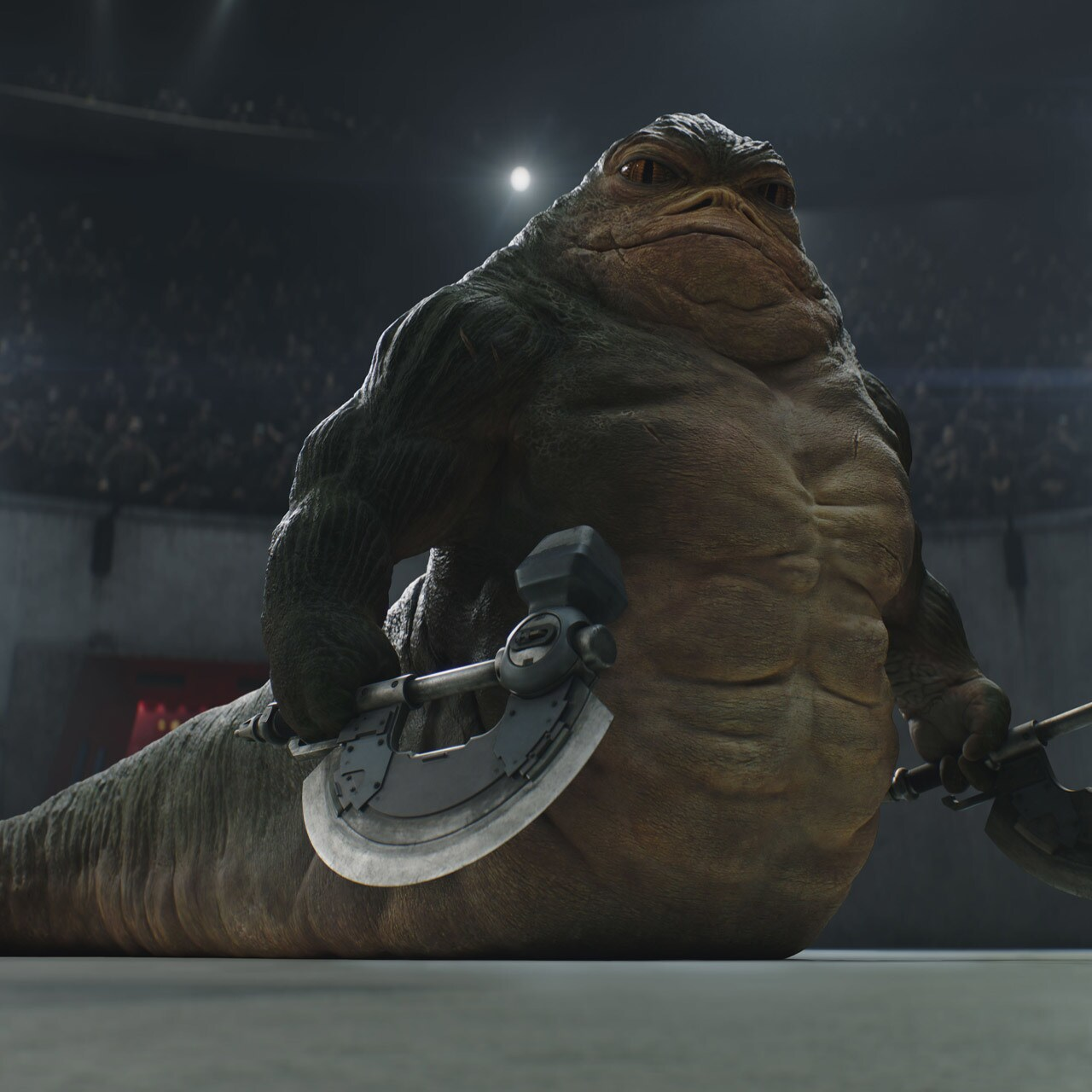
I saw Mandalorian and Grogu last night. I liked it. I thought it was fun in general, but I tend to like subversions of my expectations even if not particularly surprising, such as with Rotta the Hut. I won’t say anymore about that because, I don’t know, spoilers maybe?
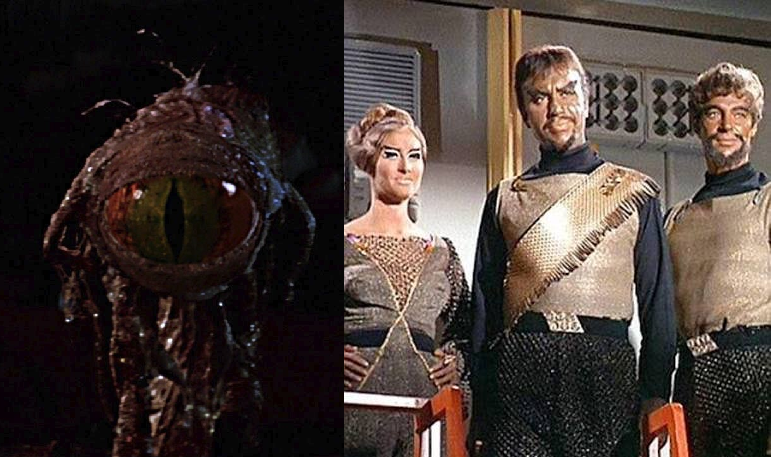
Anyway, I have a fake war with my cousin, Kessel Junkie (kessel junkie?) over which is better, Star Trek or Star Wars. Of course, Star Trek is better, but watching the movie last night, I think Star Wars does something that, if not “better,” is “neater,” than Star Trek. I think they do a much cooler job of providing a wider variety of life forms. It’s still a human-dominated, and certainly humanoid-dominated, universe, but not nearly as much as Star Trek is. Even where Star Trek dealt with a crazy difference in environment (e.g., Excalbians) or fundamental chemical structure (e.g., Hortas), Star Trek was limited by budgets, but they’re willingly bound by pseudo-science as well.
If planets are roughly Class M (i.e., Earthlike), then even with independent evolution, it’s not unreasonable to assume most life will take on certain common characteristics as a matter of logic. This idea is called physical or biological convergent evolution, so while I haven’t done any deep dives into the subject matter, I’m not just pulling it out of my ass. For example, the best elements on which life should be based are carbon, silicon, or germanium. On a very fundamental level, we would be similar to most life forms because it would be far too difficult for a planet to be expected to have more silicon or (especially) germanium than carbon. Evolution would simply favor carbon based life. But, for example, basic eye structure exist for a reason, so there’s a possible practical limitation to just how different other life can be. Of course, it’s a big universe, so there have got to be exceptions, but the point is that aliens may be more like us than we think.
But that’s the difference between science fiction and science fantasy. (Fun) Star Trek fans thrive on pointing out then resolving inconsistencies, and even with nu-Trek, the writers have traditionally tried to remain consistent and logical across series with not only science but also with stories and history, including real world history. Sometimes, that very idea is what the episode’s story is about (e.g., Return to Tomorrow, The Chase, or Distant Origin). This doesn’t mean that Star Trek fans don’t like some occasional weirdness, but limits on that weirdness are sort of baked into the Star Trek community, and I like that. Star Wars has no such limits. As science fantasy, they can simply do what’s cool, and no one will even question it. Parsecs, smarsecs. I want a space slug, so I’m getting a space slug. I also like that.
Will Star Wars ever dethrone Star Trek for me? Of course not, but fortunately none of us need to choose between the two.
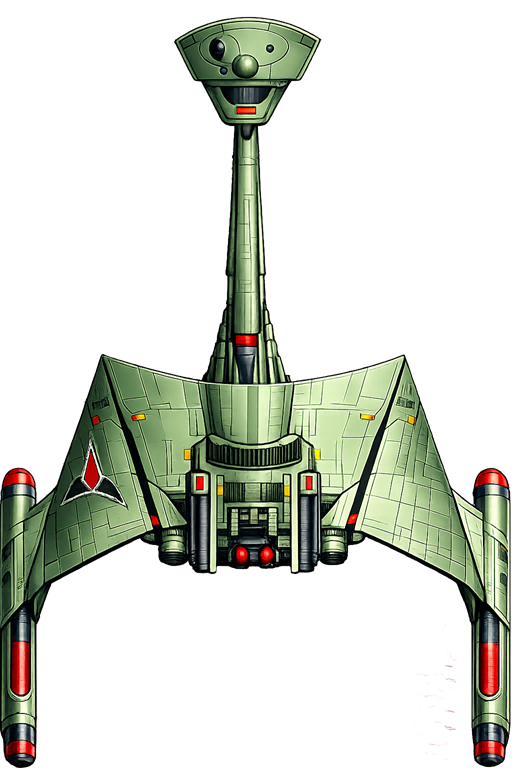
My work on my Bridge application has me contemplating all the ship designs I’ve seen in science fiction and science fantasy, and it reminded me of what my favorite design among them is. Unsurprisingly, it’s from Star Trek.
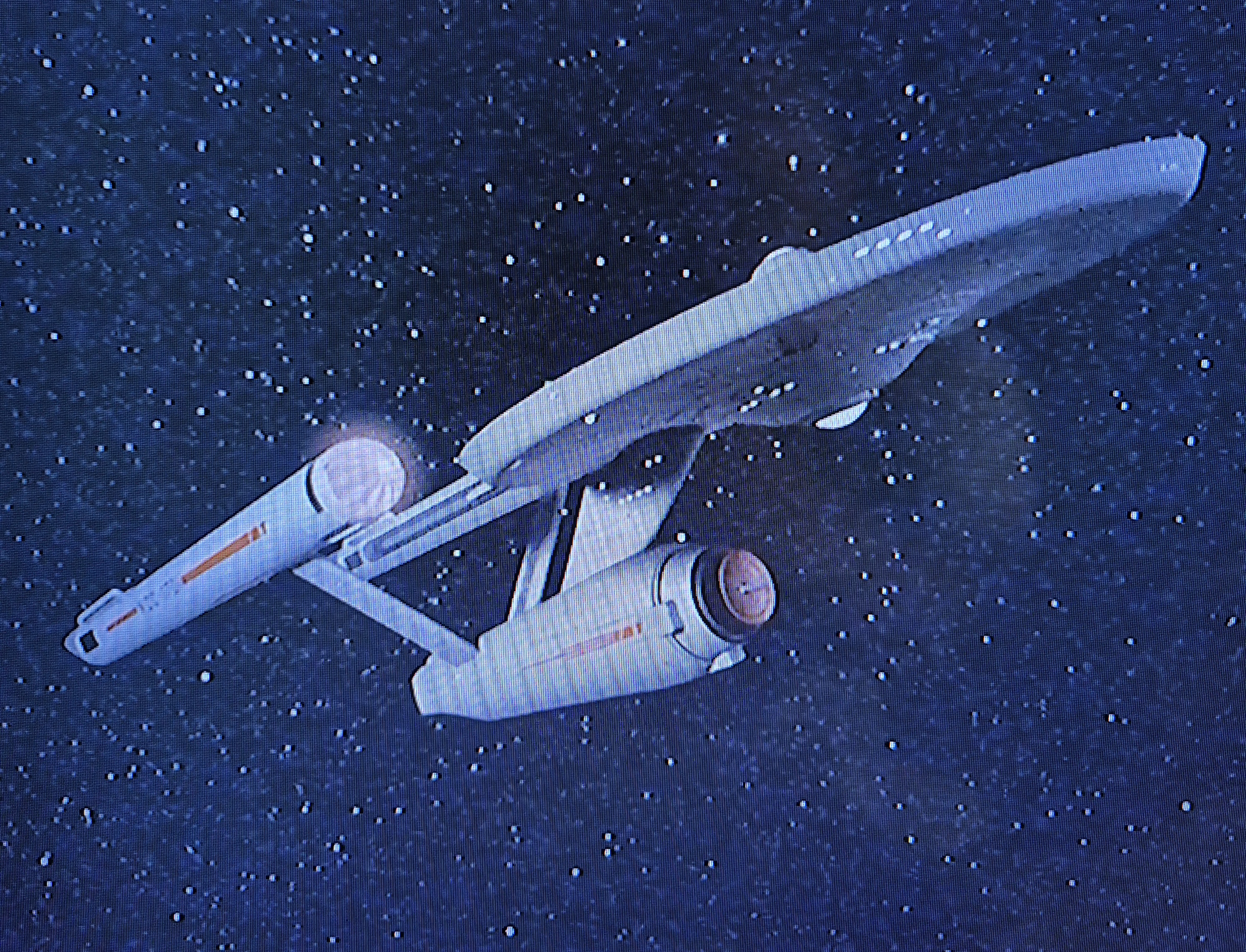
The Klingon D-7M Cruiser from the TOS movie era and beyond.
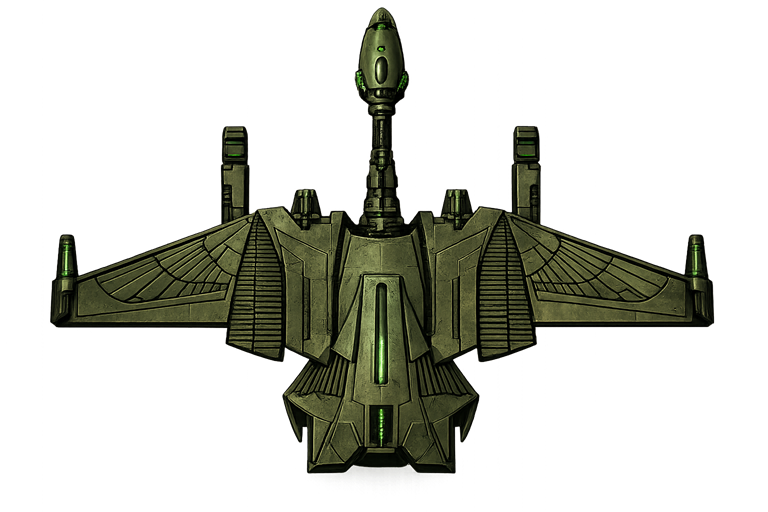
Now, let’s be crystal clear. I’m fully aware that this is 100% subjective. I’m not trying to convince anyone of anything other than to maybe mull it over and form your own opinion. However, I’m going to explain why I like it so much anyway. First, I think it emulates a jet fighter you might pilot. But in this regard, it probably isn’t any better than this ship from the FASA Star Trek RPG.
The Romulan T-10 (Bright One) Destroyer
I’ve always preferred the Romulans to the Klingons as enemies, but this one loses out (as do many other cool designs) to the D-7M for another reason: The backstory (or at least my preferred backstory) to the D-7’s design. I’ve heard a few theories as to why it has a long, thin neck separating the main hull from the bridge. First, it was to keep the poorly insulated ships from irradiating the command bubble. Second, it was to lower the forward profile of the ship when attacking, leaving it’s command center and devastating photon torpedo launcher less vulnerable to being disabled. The third explanation, though, is my favorite, and to my knowledge it comes from the Star Fleet Battles RPG that I played only once. That game positied the notion that the design made it harder to succeed in a mutiny. The thin neck was a natural bottleneck for subordinates trying to take over the command module. Also, it’s interior design had many obstacles built into it, requiring mutineerers to zigzag through the neck before getting to the command module. That gave plenty of time for the captain to detach the command module and blow up the main hull and neck before the mutineers could reach him. What’s more Klingon than that?
But ultimately, I simply like the aesthetic. As I said, this isn’t an argument.
I think Star Wars has had enough designs to come up with some really cool ones, but many are, surprisingly, more functional than creative in design. They’re closer to what I think an actual starship would look like if it were real, or maybe what you’d expect from a rebel alliance that’s repurposing far more available freighters as weapons of war. The FASA Star Trek RPG did a top notch job of expanding the Star Trek universe with some really great designs as well, but they just don’t top the D-7 for me. I should also mention that I haven’t watched a tremendous amount of science fiction and science fantasy, so maybe there’s something out there I’d like better. However, for now, the Klingons win this war. Seems appropriate.
In my last update, I hinted at something new now that the VTT is stable and good enough for production. Well, after quite a bit of work, that something new is at least to the point where I can provide screenshots. Bridge is a web-based app that manages Master Control Panels and Bridge Consoles for the FASA Star Trek RPG (think character sheets but for starships). It’s not even ready for an alpha release, but I’m certainly more than halfway to that. Eventually, it will fully integrate with my VTT, but both apps will remain independent in case you want to use one but not the other. I can appreciate wanting to sit around a real table with pen and paper but using a flat TV for the VTT battle map, but I can also appreciate wanting to use 3D models on a paper battle map while letting Bridge do all the bookkeeping for you.
Before I show you some screenshots, I want to make sure you know how the game is played in a very broad sense. In 2nd edition, starship combat can be played using the Basic game, Advanced game, Graduate game, and Command and Control (“C&C”). In an even broader sense, the game can be played as an RPG or as a board game. While it’s possible to use any game for either an RPG or a board game, the way it usually plays out is that players use (in ascending order of complexity) Basic, Advanced, or Graduate (“B/A/G”) for board games, and C&C for an RPG. In B/A/G, a player runs the entire ship (or multiple ships), so that player handles all ship duties (i.e., power allocation, shields, weapons, etc.). In C&C, the players play characters from the same ship’s crew, so each player takes on one or more roles within that crew. In other words, I might be the captain and run the engineering and science stations; you might man the helm and weapons console; and someone else might man navigation and communications/damage control. If you have enough players, everyone might have one role; otherwise, some are going to have to double up. Also of note, this game was designed for the original series TV show and movies. While there was some support for Next Generation, FASA lost the license before they could really make the rules work with the changes made by that show. My app won’t support TNG rules.
But hey. Enough talk. Here’s what it’s going to look like.
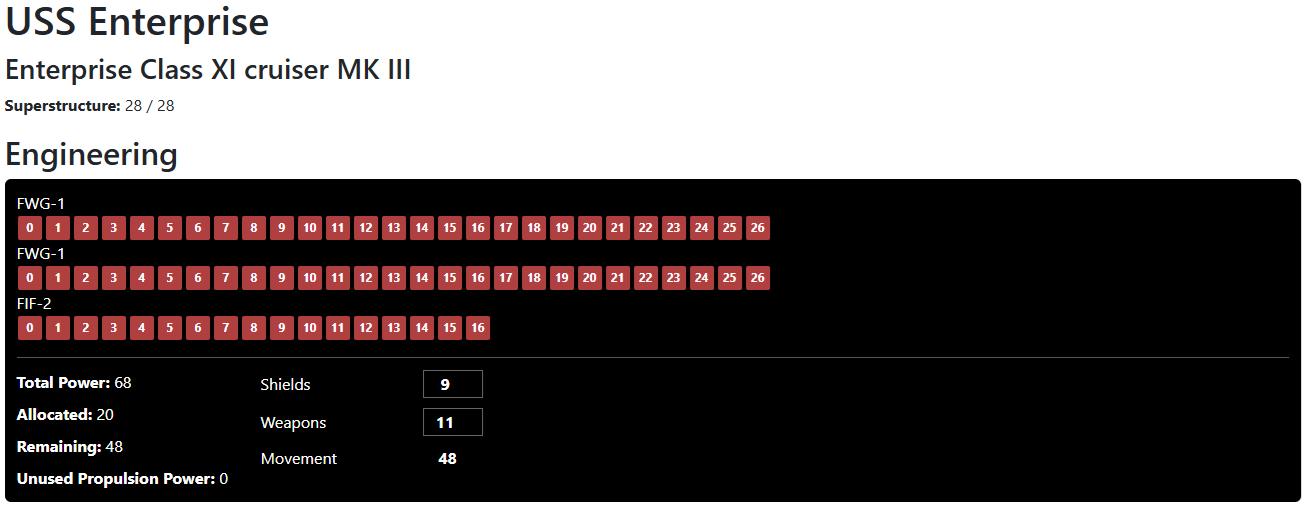
First up is the engineering console for the USS Enterprise (movie refit). If you know the game, you know what this is, but not everyone does, so here’s the basic gist. This tells you how much power your engines produce. As engines get damaged, some of those control panel lamps will go dark And your total power will decrease. In C&C, you assign power to shields, movement, and weapons according to the general request given by the Captain (e.g., “focus on shields!”). In B/A/G, because you control the entire ship, you won’t have to do this. You simply allocate power to individual systems, and when you run out of power, you may need to rethink those allocations. The point is that you can cut out the step of assigning power on the engineering screen. Note: I know the console is a little wide, I’m going to fix that, but not by much. I’m going to add a chat window to all these panels so that you can receive messages from other players or from the system itself.
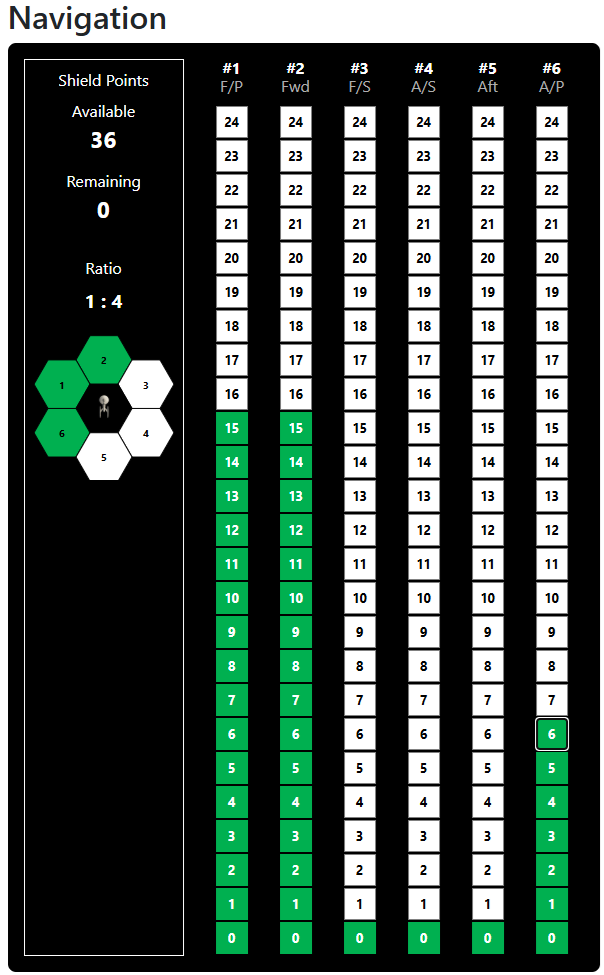
Next up is navigation. In this case, engineering assigned 9 power points to shields, but most shields operate on a favorable power ratio. In this case, those 9 power points resulted in 36 shield points, which I’ve distributed to three shields. If a shield absorbs incoming fire, the higher lamps will light yellow to reflect that. If a shield is damaged, all lamps light red. If a shield is destroyed, it goes black. For those who know the game, there’s an additional state. If a shield temporarily cannot use the power that was allocated to it because the engines (or engineering itself) took a hit, the navigator must choose which shields lose power, and the lamps at the top turn orange. If the engines are repaired during the current turn, those orange lamps will once again turn yellow or, more likely, green due to the repower phase.
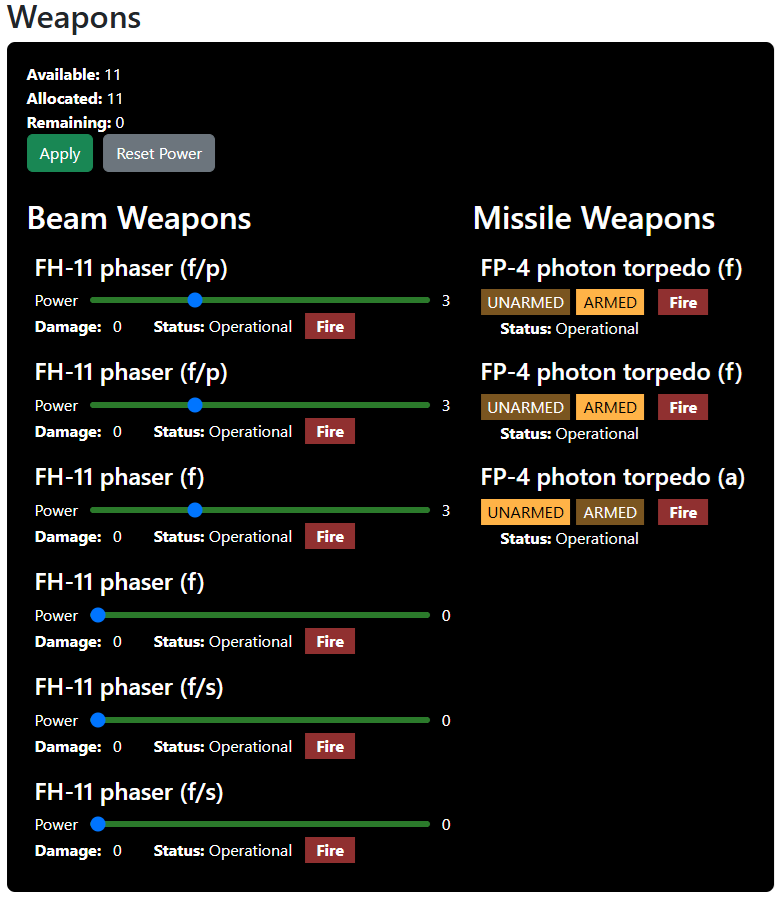
Next up, we have the weapons console. Note that this is not the helm. I’ve divided them for two reasons. The in-universe reason is that, in the movies, the weapons console was separate from helm. The in-game reason is that you want to be able to create as much of a sensible division among responsibilities as you can to accommodate the varying number of players that may be at the table. In any event, you can see that I’ve armed two photon torpedoes and energized two phasers.
But Rob! What about the Romulans?!?! Hey, I always favored the Romulans as the enemy. I’ve got it covered.
I’m not the best at naming ships.
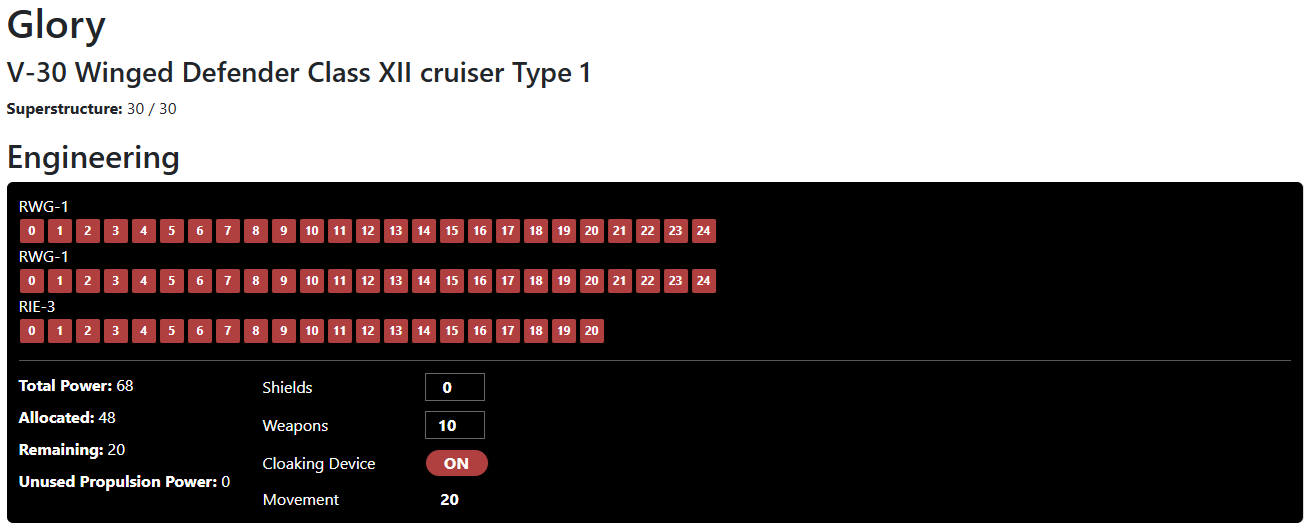
Here you can see that there’s a new button on Engineering to turn on the cloaking device.
And here you can see that this Romulan ship has a plasma torpedo instead of those lame-ass photon torpedoes. That’ll knock your ship out of whack.
Wait a second. Why’s it crooked? There’s no up in space.
The next console on the list is the damage control panel, but first I have to do some boring architectural work with the turn/phase system. Then I have to tackle the helm and science station, and then my own invention: The captain’s console panel. More coming.
My FASA Star Trek RPG VTT has received major upgrades. You can find it by clicking here.
Among the upgrades: More “obstacles” to put on the map. More importantly, you can create a room so that you can play with people remotely. The rooms have passwords and allow the creator (“administrator”) to lock the rooms so even passwords can’t get you in. The creator must then respond to your requests, clicking ignore if the user is spamming.
Cloaking is now an option, as you can make a ship invisible. Unfortunately, line of sight is not yet implemented, so you have to manually toggle your visibility when retreating behind an obstacle.
There are a few more quirks to resolve, and there are some Klingon ships missing, but I’m focused on a new app to provide master control panels that will interact with the VTT. Once that’s done, I’ll shake out the remaining features for the VTT.
Remember, this app isn’t turning the game into a video game. Even if you’re 100% digital, it’s intended to be played as the pen and paper game was. You’ll need to reference an MCP in order to make use of it. For now, the MCP would have to be pen & paper, but stay tuned.
If you enjoy this post, please retweet it (Twitter/X), boost it (Mastodon), repost it (MeWe), or repost it (BlueSky).
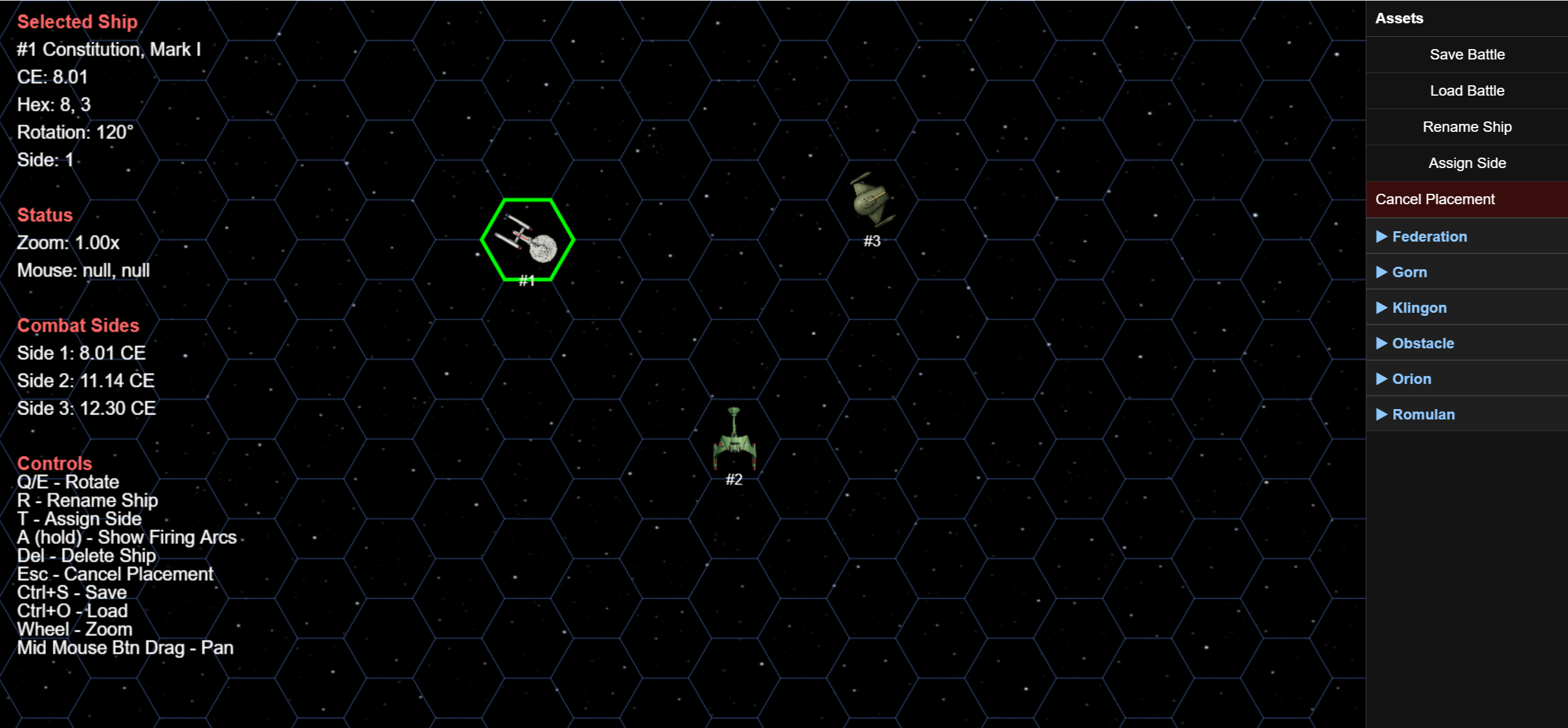
I’ve created a VTT (virtual table-top) for the FASA Start Trek Starship Combat system. This may not appeal to the few of you that still play the game because this is not intended to turn the RPG into a video game. It’s intended to facilitate online play for the RPG. You could certainly use it for the starship combat system alone, which is often used as a board game, but however you play, you’ll need your ship recognition panels. The game does very little along the lines of game mechanics.
The only mechanics it handles are calculation of 1) your fleet’s total combat efficiency, and 2) range to target. The VTT just tells you the range to target is # hexes. Whether or not you have the power points to move to that target hex, or hit an enemy ship located there, is something you need to gather from your character sheet.
My inspiration for creating this is that I’m planning to introduce my gaming groups to the game. One of our group moved across country, so he has to dial in. Using MS Teams, I can give him access to the game board, both visually and in terms of allowing him to take control of the screen and move his ships around. That said, a planned future enhancement will be to implement remote multiplayer rooms, allowing him (or any remote player) to join our game just by entering a game room code. Remember, though; it’s not a video game.
This is in beta test, which means a few things.
I’m seeking honest feedback on the user interface. Does anything bother you, even if just a little? Do you have any preferences? Were the basic instructions on the left side of the screen clear enough to understand? If so, are the shortcut keys intuitive? No nitpicks are too nitpicky.
There are still a few tweeks I need to add in. For example, select a ship and hold the A key, and four firing arcs appear (forward, port, aft, and starboard). Let go of the A key, and they’ll disappear. The problem is that space stations use three firing arcs, not four, but for now they’re showing four. That’s literally the next item on my to-do list, but I’d like to add others.
I have yet to add every ship in the game. The Federation is almost complete, but there’s plenty more Klingon and Romulan ships to add. The Gorn and Orions are complete but only because there aren’t many options for those cultures. I’m considering adding the ships in the fan-created Gorn and Orion ship recognition manuals, but because they’re third party products, that’s low on my list of priorities. That said, there are certainly enough ships right now to actually play a game. The ships it has are the ones you’re most likely to use anyway.
Other items on my to-do list include better interaction with obstacles (e.g., asteroids, planets, stars), alternative panning controls, search function for the list of assets, better movement visualization tools. How these enhancements are implemented will rely heavily on the feedback I receive.
Once I have a full release, I’ll place the code on github, after which I’ll create another VTT to deal with the personal combat system, and then after that convert my MS Access character builder application to a web application.
If you enjoy this post, please retweet it (Twitter/X), boost it (Mastodon), repost it (MeWe), or repost it (BlueSky).
As readers of this blog are aware, Luddite Vic and I have been working on Masterplan. I’ve been cleaning up the libraries and supplying projects and libraries for my 4e Dungeon Delves based on 1e adventures, and Vic has been cleaning up the application itself by modifying the code. You can download his latest beta test application here (choose the first link, “Masterplan 13.0.2 – BETA – Upgrades .Net from 4.8 to 8. Implements some fixes and new functionality- For testing ONLY”).”
You might also be aware of my Gamma World 7e character builder and game management system and its alternative, a prompt suitable for ChatGPT that generates GW7e characters.
The issue with my GW7e character builder is that it’s written in MS Access. That means, to run it, 1) without jumping through major hoops, you have to be using a PC, not an Apple product; and 2) you have to have Microsoft Office (any version) installed. The issue with my AI prompt is that many people refuse to use AI. Well, I can’t help any of you with the inability to use a character builder for the technical or social reasons mentioned, but GW7e is so similar to Dungeons & Dragons 4e that you can easily use Masterplan as is to run GW7e. Nevertheless, I asked Vic to add support for GW7e in his Masterplan 13.0.2 beta version, and he incorporated every one of them within an hour. There’s really not much of a difference between the systems.
My Point
And that brings me to the point of this post. I added my GW7e monster library to my D&D 4e Resources page, but now I’m adding the project file for you to run Steading of the Iron King, which is the adventure included with the base box set for the game. I’ve also included the player characters I generated that are loaded into that project file as project PCs. Of course, you can use their own. They’re just ones I randomly created. Trigger warning: The project file uses a lot of AI-generated imagery. But keep in mind that 1) art improves the gaming experience; 2) using WotC’s art would lead to threats, which discourages fans from distributing material in the first place; and 3) I’m not going to pay an artist to produce art for what will eventually be a two-shot adventure. If you don’t like the use of the art, delete it, or just don’t download the project. This isn’t my job. I don’t rely on clicks or downloads to pay my mortgage.
An Observation
Steading of the Iron King really is a below-average adventure. It’s nothing more than a dungeon crawl, which never appeal to me. (YMMV, of course.) However, the game itself is so damn goofy that everyone had a lot of fun despite that. The game seemed to get everyone into the spirit of the goofiness. If you haven’t played it, do so.
If you enjoy this post, please retweet it (Twitter/X), boost it (Mastodon), repost it (MeWe), or repost it (BlueSky).
I made several updates to the Masterplan libraries. You can find them at my D&D 4e Resources Page. I went through all the libraries and cleaned up all the traps and hazards. Not all libraries have revised copies uploaded. I’m holding off on those until I get around to cleaning up their monster stat blocks.
This clean up process is going far beyond the libraries. Luddite Vic has been cleaning up the application itself and at my request has added some minor support for Gamma World 7e. With that in mind, I also uploaded the library for the Gamma World 7e base rulebook.